Introdução
Is your laptop not loading pages correctly? Consider using this guide to replace the RAM in your laptop.
O que você precisa
-
-
Flip the laptop over so that the bottom of the laptop is facing upwards.
 Pergunte ao FixBot
-
-
-
-
Unscrew and remove the two screws from the back panel labeled "Memory" with a Phillips #0 screwdriver.
-
-
-
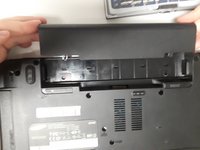
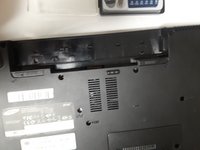
Place the flat end of the spudger or your fingers, if possible, between the panel and the laptop. Pry the panel by moving the spudger up and down until the panel can be removed.
-
-
-
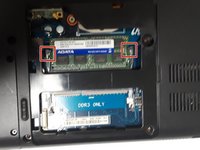
Release the two holding pins by pushing them away from each other with your fingers or a spudger.
-
-
-
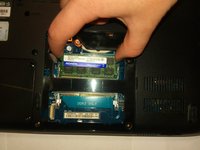
Pull the RAM out of the laptop with your fingers by gently lifting it up.
-





To reassemble your device, follow these instructions in reverse order.

Equipe

University of North Texas, Team S6-G4, Thompson Fall 2018 Membro de University of North Texas, Team S6-G4, Thompson Fall 2018
UNT-THOMPSON-F18S6G4
4 Membros
Autoria de 6 guias
