Ir para o conteúdo principal
Participe da comunidade de reparos - Criar conta

Samsung Instinct Camera Replacement

O que você precisa

  1. Samsung Instinct Camera Replacement, Battery: passo 1, imagem 1 %32
    • Apply pressure to the back cover and slide it forward towards the camera.

    • Lift the back cover off the phone.

    Pergunte ao FixBot

    Comentar

  2. Samsung Instinct Camera Replacement: passo 2, imagem 1 %32
    • Holding the phone firmly, use the notches to grip and lift up the battery.

    Pergunte ao FixBot

    Comentar

  3. Samsung Instinct Camera Replacement, Back Case: passo 3, imagem 1 %32
    • Remove the four 4.45mm screws at the corners of the phone.

    Pergunte ao FixBot

    Comentar

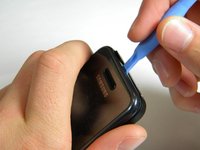
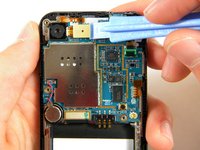
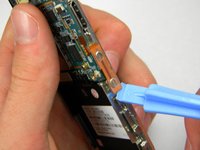
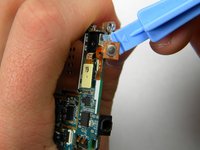
  4. Samsung Instinct Camera Replacement: passo 4, imagem 1 %32 Samsung Instinct Camera Replacement: passo 4, imagem 2 %32
    • Use the plastic opening tool to unhinge the locks around the edges of the phone.

    • Do not worry about the inner components of the phone; they are not connected to this case.

    Pergunte ao FixBot

    Comentar

  5. Samsung Instinct Camera Replacement: passo 5, imagem 1 %32
    • Lift the casing off of the phone.

    Pergunte ao FixBot

    Comentar

  6. Samsung Instinct Camera Replacement, Antenna: passo 6, imagem 1 %32
    • With the screws removed, locate the antenna.

    Pergunte ao FixBot

    Comentar

  7. Samsung Instinct Camera Replacement: passo 7, imagem 1 %32
    • Using a Phillips head screwdriver, remove the 4.50mm screw holding the antenna in place.

    Pergunte ao FixBot

    Comentar

  8. Samsung Instinct Camera Replacement: passo 8, imagem 1 %32
    • Using the plastic opener tool, squeeze gently on the antenna cable connector and lift to remove the connector from its position.

    Pergunte ao FixBot

    Comentar

  9. Samsung Instinct Camera Replacement: passo 9, imagem 1 %32
    • Gently lift up on the antenna and remove it from the back of the device.

    Pergunte ao FixBot

    Comentar

  10. Samsung Instinct Camera Replacement, Front Case: passo 10, imagem 1 %32
    • Remove the two 3.50mm screws connecting the motherboard to the case.

    Pergunte ao FixBot

    Comentar

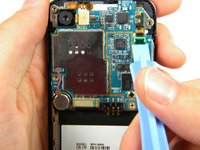
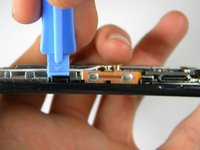
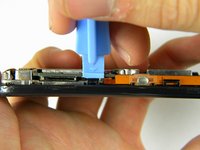
  11. Samsung Instinct Camera Replacement: passo 11, imagem 1 %32 Samsung Instinct Camera Replacement: passo 11, imagem 2 %32 Samsung Instinct Camera Replacement: passo 11, imagem 3 %32
    • Use the plastic opener tool to detach the three ribbons on the motherboard.

    Pergunte ao FixBot

    Comentar

  12. Samsung Instinct Camera Replacement: passo 12, imagem 1 %32
    • Lift out the top right ribbon from its slot on the motherboard.

    Pergunte ao FixBot

    Comentar

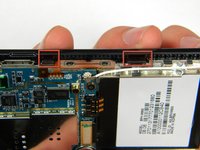
  13. Samsung Instinct Camera Replacement: passo 13, imagem 1 %32 Samsung Instinct Camera Replacement: passo 13, imagem 2 %32
    • Use the plastic opener tool to unhinge the the locks on the side of the motherboard connecting it to the front casing.

    Pergunte ao FixBot

    Comentar

  14. Samsung Instinct Camera Replacement: passo 14, imagem 1 %32
    • Lift the motherboard away from the front casing.

    Pergunte ao FixBot

    Comentar

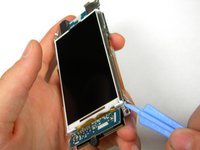
  15. Samsung Instinct Camera Replacement: passo 15, imagem 1 %32
    • After removing lifting up on the motherboard, the front casing and center frame should be separated as shown.

    Pergunte ao FixBot

    Comentar

  16. Samsung Instinct Camera Replacement, Motherboard: passo 16, imagem 1 %32 Samsung Instinct Camera Replacement, Motherboard: passo 16, imagem 2 %32 Samsung Instinct Camera Replacement, Motherboard: passo 16, imagem 3 %32
    • Using the plastic opener tool, gently pry away the side strip control buttons from the metal center frame.

    • There are three strips total: one on the right, left, and top of the phone.

    Pergunte ao FixBot

    Comentar

  17. Samsung Instinct Camera Replacement: passo 17, imagem 1 %32
    • Using the plastic opener tool, pry the speaker connector away from the back of the motherboard.

    Pergunte ao FixBot

    Comentar

  18. Samsung Instinct Camera Replacement: passo 18, imagem 1 %32
    • Using the plastic opener tool, remove the speaker from its setting.

    • Pry where the wire enters the speaker.

    • The speaker has adhesive on the bottom, thus removing it will require a bit of wiggling.

    Pergunte ao FixBot

    Comentar

  19. Samsung Instinct Camera Replacement: passo 19, imagem 1 %32
    • Gently lift the motherboard from the center frame.

    Pergunte ao FixBot

    Comentar

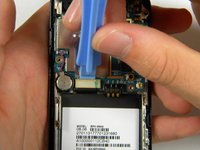
  20. Samsung Instinct Camera Replacement, Camera: passo 20, imagem 1 %32
    • Once the motherboard is removed from the frame, use the pry tool to remove the camera.

    • Insert the pry bar between the camera and the frame then lift up.

    • The camera is held in by adhesive so it will require some force to remove.

    • You have now successfully removed the camera from your Samsung Instinct.

    Pergunte ao FixBot

    Comentar

Conclusão

To reassemble your device, follow these instructions in reverse order.

Cancelar: não concluí este guia.

2 outras pessoas executaram este guia.

Patrick

Membro desde: 10/11/11

75 Reputação

Autoria de 2 guias

Equipe

Cal Poly, Team 3-13, Regan Fall 2011 Membro de Cal Poly, Team 3-13, Regan Fall 2011

CPSU-REGAN-F11S3G13

4 Membros

Autoria de 16 guias

0Comentários do guia

Comentar

Visualizações:

Últimas 24 horas: 4

Últimos 7 dias: 14

Últimos 30 dias: 68

Ao todo: 1,180