Introdução
Replacing the Wi-Fi card may be necessary if your device experiences slow or unstable internet connections. This guide will walk you through removing and installing a new Wi-Fi card to restore proper functionality.
Before beginning, power off the device and disconnect the battery to prevent electrical damage. This repair requires basic tools such as a Philips #0 screwdriver,, and involves handling small internal components. Use caution when working inside the device, as cables and connectors are fragile and can be easily damaged.
O que você precisa
-
-
Orient the phone with the screen facing downward.
-
Slide the panel away from the camera using your thumb. This will expose the battery.
 Pergunte ao FixBot
-
-
-
Insert the tip of the spudger on the left side of the battery.
-
Pry the battery out. It will pivot in the direction of the white arrow.
-
-
-
Remove the six 3.5 mm screws using a Phillips #000 screwdriver. Unscrew in a counterclockwise direction.
-
-
-
Gently pry around the edges with the spudger to remove back panel.
-
The side buttons will become loose and will fall out, so put these in a safe place.
-
-
-
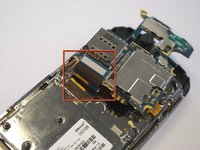
Gently remove the black wire to free the circuit board.
-
Remove the wire by gently prying up the gold terminator attached to the green circuit board.
-
-
-
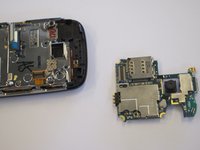
Gently tug the black and blue ribbon upwards to release the circuit board.
-
-
-
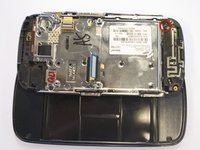
Use a Phillips screwdriver to remove the six 3.5 mm screws by rotating.
-
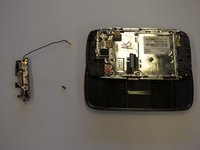
The antenna assembly will snap off.
-




To replace the antenna and reassemble your device, follow the steps in reverse order.
Cancelar: não concluí este guia.
Uma outra pessoa concluiu este guia.

Equipe

Cal Poly, Team 8-10, Regan Spring 2011 Membro de Cal Poly, Team 8-10, Regan Spring 2011
CPSU-REGAN-S11S8G10
4 Membros
Autoria de 23 guias
