Ir para o conteúdo principal
Participe da comunidade de reparos - Criar conta

Samsung Gear S2 Battery Replacement

O que você precisa

  1. Samsung Gear S2 Battery Replacement, Watch Strap: passo 1, imagem 1 %32 Samsung Gear S2 Battery Replacement, Watch Strap: passo 1, imagem 2 %32
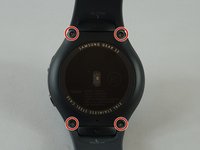
    • Flip the watch over so that the face is down.

    • Using a Y#0 screwdriver, unscrew the four 3.5 millimeter tri-head screws.

    • Remember to turn off the watch to avoid being shocked.

    Pergunte ao FixBot
  2. Samsung Gear S2 Battery Replacement: passo 2, imagem 1 %32 Samsung Gear S2 Battery Replacement: passo 2, imagem 2 %32
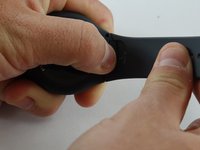
    • Using your finger, push forward on the release while pulling up on the strap.

    • You may find it helpful to use the flat end of a spudger to push on the release instead of your finger.

    Pergunte ao FixBot
  3. Samsung Gear S2 Battery Replacement: passo 3, imagem 1 %32 Samsung Gear S2 Battery Replacement: passo 3, imagem 2 %32
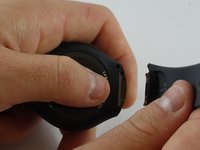
    • Repeat the procedure from step 2 for the other strap.

    Pergunte ao FixBot
  4. Samsung Gear S2 Battery Replacement, Back: passo 4, imagem 1 %32 Samsung Gear S2 Battery Replacement, Back: passo 4, imagem 2 %32
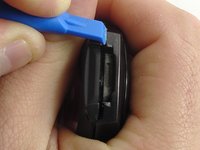
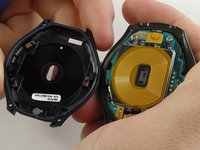
    • Insert a plastic opening tool between the top and bottom portions of the case, and gently pry off the back.

    • Do not insert the tool more than 3 millimeters into the case. Inserting more than 3 mm may damage the seal and electric components.

    Pergunte ao FixBot
  5. Samsung Gear S2 Battery Replacement, Motherboard: passo 5, imagem 1 %32 Samsung Gear S2 Battery Replacement, Motherboard: passo 5, imagem 2 %32
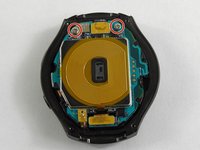
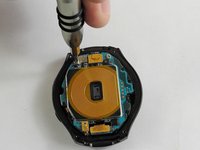
    • Using a Philips head #00 screwdriver, remove the two 3.6 millimeter screws.

    Pergunte ao FixBot
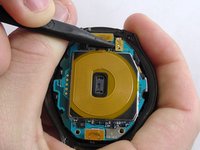
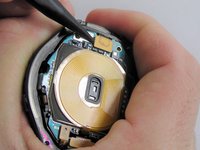
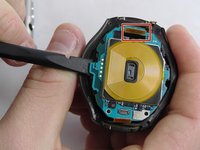
  6. Samsung Gear S2 Battery Replacement: passo 6, imagem 1 %32 Samsung Gear S2 Battery Replacement: passo 6, imagem 2 %32 Samsung Gear S2 Battery Replacement: passo 6, imagem 3 %32
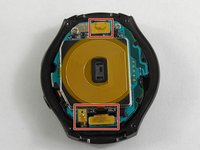
    • Using a spudger, pry up the three cables.

    Pergunte ao FixBot
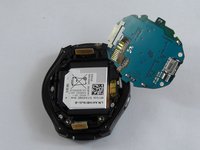
  7. Samsung Gear S2 Battery Replacement: passo 7, imagem 1 %32 Samsung Gear S2 Battery Replacement: passo 7, imagem 2 %32
    • Using the flat end of a spudger, pry up the motherboard.

    • Make sure the cable is fed through the hole to avoid damaging it.

    • The motherboard is attached to the battery casing, so place the motherboard in the orientation shown once freed.

    Pergunte ao FixBot
  8. Samsung Gear S2 Battery Replacement, Battery: passo 8, imagem 1 %32 Samsung Gear S2 Battery Replacement, Battery: passo 8, imagem 2 %32
    Ferramenta utilizada neste passo:
    Tweezers
    $4.99
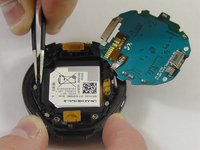
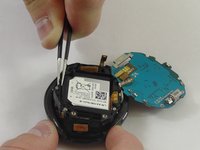
    • Using tweezers, lift the battery casing.

    • Make sure the cables are fed through their gaps to avoid damaging them.

    Pergunte ao FixBot
  9. Samsung Gear S2 Battery Replacement: passo 9, imagem 1 %32 Samsung Gear S2 Battery Replacement: passo 9, imagem 2 %32
    • Flip the battery casing over and using a spudger, push on the battery to free it from the casing.

    • Once the battery is free, use the flat end of a spudger to lift up the battery cable.

    Pergunte ao FixBot
Conclusão

To reassemble your device, follow these instructions in reverse order.

103 outras pessoas executaram este guia.

Jacob Baldwin

Membro desde: 02/20/17

3.459 Reputação

Autoria de 5 guias

Equipe

USF Tampa, Team S2-G3, Sullivan Spring 2017 Membro de USF Tampa, Team S2-G3, Sullivan Spring 2017

USFT-SULLIVAN-S17S2G3

3 Membros

Autoria de 23 guias

39Comentários do guia

Excellent guidelines, and do you have steps for s3 frontier

pedro tiburcio - Responder Compartilhar
A reference to the battery part number would be great.

Harold Turner - Responder Compartilhar
Very good job and very easy

JEAN PIERRE - Responder Compartilhar

I have the Gear S2 3G version R730V and purchased a battery thinking these instructions would work, but once I opened the watch it is not the same as the one above. Does anyone have instructions on how to replace the batter on the R730V??

Irene - Responder Compartilhar

Comentar

Visualizações:

Últimas 24 horas: 6

Últimos 7 dias: 39

Últimos 30 dias: 222

Ao todo: 161,805