Essa tradução foi gerada por um programa e ainda não foi revisada por uma pessoa. Falas essa língua? Dá uma olhada.
Introdução
Este guia mostra como remover todos os componentes do conjunto do display.
O que você precisa
-
-
-
Insira uma unha ou uma ferramenta de abertura de plástico na fenda entre a carcaça traseira e a base do celular.
 Pergunte ao FixBot
-
-
-
Deslize a unha ou uma Ferramenta de abertura de plástico ao longo da borda da carcaça traseira.
-
Levante a carcaça gentilmente da base.
-
-
-
-
-
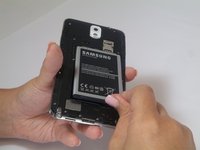
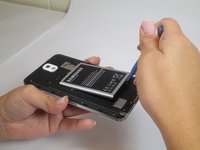
Insira a unha ou uma Ferramenta de abertura de plástico na pequena fresta entre a bateria da base e o restante do celular.
-
Levante a bateria para retirá-la do seu compartimento.
-
-
-
-
-
Coloque a unha na ranhura da caneta stylus.
-
Puxe a caneta stylus para fora do celular.
-
-
-
-
-
Remova os doze parafusos Phillips de 4 mm do chassi traseiro.
-
-
-
-
Insira a Ferramenta de abertura de plástico no suporte de encaixe da caneta Stylus.
-
Levante a Ferramenta de abertura de plástico para que a estrutura central se separe da base.
-
-
-
-
-
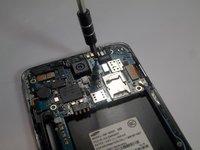
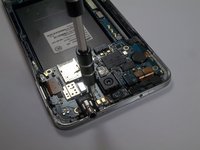
Remova o parafuso único ao lado da entrada para fone de ouvido.
-
-
Ferramenta utilizada neste passo:Tweezers$4.99
-
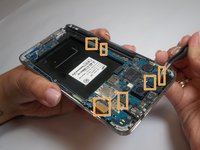
Use a pinça para remover ambos os clipes de antena.
-
Use uma espátula para desconectar seis conectores de cabo.
-
-
-
-
-
Insira a espátula na entrada para fone de ouvido.
-
-
-
Levante a espátula para separar o conjunto da entrada da placa-mãe.
-
Puxe para remover.
-
-
-
-
-
Remova o suporte metálico localizado no canto superior esquerdo.
-
-
Ferramenta utilizada neste passo:Tweezers$4.99
-
Remova o motor de vibração puxando-o cuidadosamente para cima com a pinça.
-
-
-
Levante a porta USB do conjunto frontal usando a pinça.
-
-
-
Agora você ficará apenas com o conjunto do display.
-
-






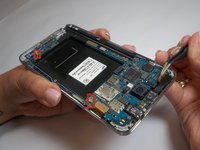


Para a remontagem de seu dispositivo, siga estas instruções na ordem inversa.
Cancelar: não concluí este guia.
147 outras pessoas executaram este guia.

Equipe

USF Tampa, Team 2-2, Blackwell Fall 2014 Membro de USF Tampa, Team 2-2, Blackwell Fall 2014
USFT-BLACKWELL-F14S2G2
4 Membros
Autoria de 84 guias
10Comentários do guia
είναι απόλυτα κατανοητό.
Can you just replace the digitizer or is the digitizer glue down to good to the display where it might damage the LCD display when trying to replace the digitizer?
to safely remove the LCD display from the front touch screen glass w/o damaging the LCD screen I advise you to invest in and familiarize yourself with an LCD Separator machine and all the accessories that go along with it. Also, search for the machine and watch the videos..
Can you just replace the digitizer or is the digitizer glue down to good to the display where it might damage the LCD display when trying to replace the digitizer?
Can you just replace the digitizer or is the digitizer glue down to good to the display where it might damage the LCD display when trying to replace touch
