Introdução
Follow the steps in order to replace your battery.
If your battery is swollen, take appropriate precautions.
O que você precisa
-
-
Insert a fingernail or plastic opening tool in the gap between the rear case and the base of the phone.
 Pergunte ao FixBot
-
-
-
-
Slide your fingernail or plastic opening tool along the edge of the rear case.
-
Lift the case gently from the base.
-
-
-
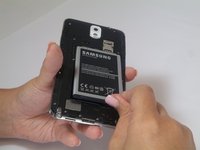
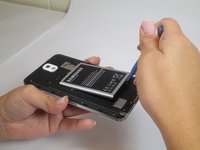
Insert a fingernail or plastic opening tool into the small gap between the battery and the phone base.
-
Lift the battery out of its recess.
-


To reassemble your device, follow these instructions in reverse order.
Cancelar: não concluí este guia.
48 outras pessoas executaram este guia.

4Comentários do guia
Simples...
I am a technological genius! ( with your help )
Why need a opening tool lol
Mon telephone ne garde pas la charge plus d'une heure même si j'ai changé la batterie mais reste le même problème
