Ir para o conteúdo principal
Participe da comunidade de reparos - Criar conta

Samsung Galaxy Mega Front Facing Camera Replacement

O que você precisa

  1. Samsung Galaxy Mega Front Facing Camera Replacement, Battery: passo 1, imagem 1 %32 Samsung Galaxy Mega Front Facing Camera Replacement, Battery: passo 1, imagem 2 %32 Samsung Galaxy Mega Front Facing Camera Replacement, Battery: passo 1, imagem 3 %32
    • Before starting, ensure device is completely turned off.

    • On the back of phone, locate the slot on the top left corner.

    • Insert plastic opening tool or fingernail and pull up on the back plate.

    • With the corner released, slide your finger around the device between the back plate and the phone to release connectors.

    Pergunte ao FixBot

    Comentar

  2. Samsung Galaxy Mega Front Facing Camera Replacement: passo 2, imagem 1 %32 Samsung Galaxy Mega Front Facing Camera Replacement: passo 2, imagem 2 %32 Samsung Galaxy Mega Front Facing Camera Replacement: passo 2, imagem 3 %32
    • Insert fingernail into the slot on bottom of battery and gently pull up.

    • Remove the battery.

    Pergunte ao FixBot

    Comentar

  3. Samsung Galaxy Mega Front Facing Camera Replacement, Midframe: passo 3, imagem 1 %32 Samsung Galaxy Mega Front Facing Camera Replacement, Midframe: passo 3, imagem 2 %32 Samsung Galaxy Mega Front Facing Camera Replacement, Midframe: passo 3, imagem 3 %32
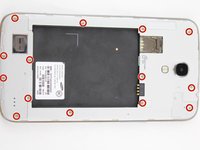
    • Remove the 14 3.45 mm Phillips #000 screws from the assembly.

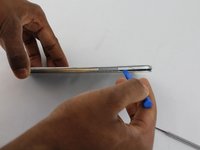
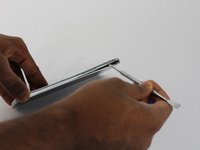
    • Gently, insert plastic opening tool into seam above the volume buttons of your phone.

    • You may substitute metal spudger for plastic opening tool to first start the opening of the seam. This may cause exterior cosmetic damage.

    Pergunte ao FixBot

    Comentar

  4. Samsung Galaxy Mega Front Facing Camera Replacement: passo 4, imagem 1 %32 Samsung Galaxy Mega Front Facing Camera Replacement: passo 4, imagem 2 %32
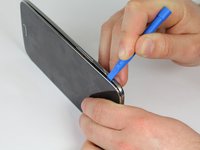
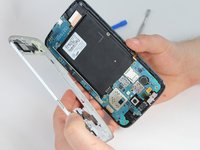
    • Slowly slide plastic opening tool around the device to release all the connectors internal to the device.

    • The device should easily come apart after the plastic opening tool is slid around the entire device.

    • During reassembly, ensure volume and power buttons align properly.

    Pergunte ao FixBot

    Comentar

  5. Samsung Galaxy Mega Front Facing Camera Replacement, Front Facing Camera: passo 5, imagem 1 %32
    • Remove the one 2.55 mm Phillips #000 screw from top left of motherboard assembly.

    Pergunte ao FixBot

    Comentar

  6. Samsung Galaxy Mega Front Facing Camera Replacement: passo 6, imagem 1 %32
    • Remove metal cover with plastic opening tool.

    Pergunte ao FixBot

    Comentar

  7. Samsung Galaxy Mega Front Facing Camera Replacement: passo 7, imagem 1 %32 Samsung Galaxy Mega Front Facing Camera Replacement: passo 7, imagem 2 %32
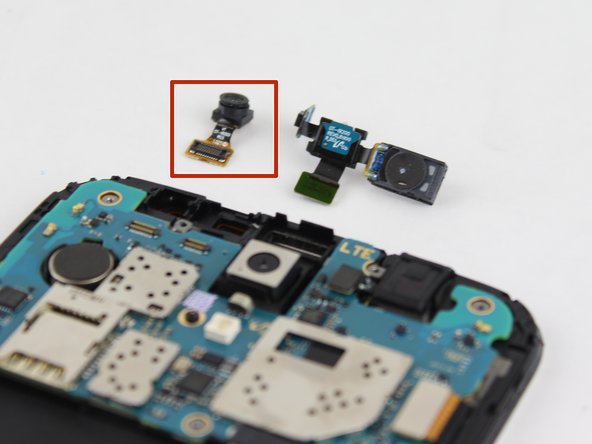
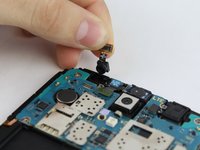
    • Lift the motherboard connector and remove the camera assembly from phone.

    Pergunte ao FixBot

    Comentar

Conclusão

To reassemble your device, follow these instructions in reverse order.

Cancelar: não concluí este guia.

3 outras pessoas executaram este guia.

Max Rathman

Membro desde: 02/04/16

915 Reputação

Autoria de 4 guias

Equipe

USF Tampa, Team 17-2, Blackwell Winter 2016 Membro de USF Tampa, Team 17-2, Blackwell Winter 2016

USFT-BLACKWELL-W16S17G2

4 Membros

Autoria de 16 guias

0Comentários do guia

Comentar

Visualizações:

Últimas 24 horas: 0

Últimos 7 dias: 10

Últimos 30 dias: 37

Ao todo: 1,158