Ir para o conteúdo principal
Participe da comunidade de reparos - Criar conta

Samsung Galaxy Gear Camera Replacement

O que você precisa

    1. Samsung Galaxy Gear Camera Replacement, Band: passo 1, imagem 1 %32
      • Loosen the camera ribbon so it will easily pass through the watch body.

      Pergunte ao FixBot

      Comentar

    2. Samsung Galaxy Gear Camera Replacement: passo 2, imagem 1 %32 Samsung Galaxy Gear Camera Replacement: passo 2, imagem 2 %32
      • Grip the body of the watch and pull the band upward.

      • Do the same with the adjacent band, but there will be no camera ribbon to pass through the watch body.

      Pergunte ao FixBot

      Comentar

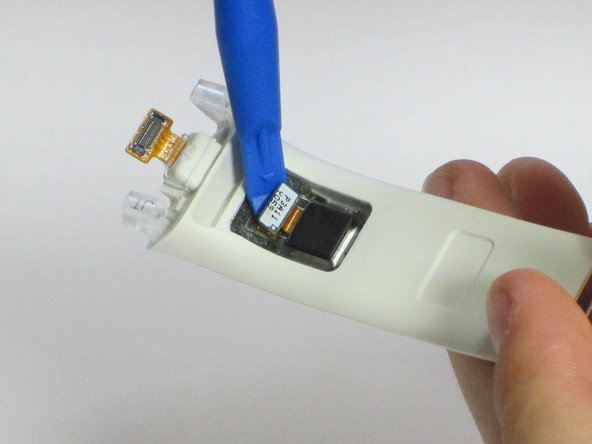
    1. Samsung Galaxy Gear Camera Replacement, Camera: passo 3, imagem 1 %32 Samsung Galaxy Gear Camera Replacement, Camera: passo 3, imagem 2 %32
      • Use the plastic opening tool to pry the camera backdoor.

      • Use the plastic opening tool to pry the tab and pull the camera.

      Pergunte ao FixBot

      Comentar

Conclusão

To reassemble your device, follow these instructions in reverse order.

Cancelar: não concluí este guia.

3 outras pessoas executaram este guia.

Jenny Verheul

Membro desde: 04/28/16

194 Reputação

Autoria de 1 guia

Equipe

Cal Poly, Team 1-9, Maness Spring 2016 Membro de Cal Poly, Team 1-9, Maness Spring 2016

CPSU-MANESS-S16S1G9

4 Membros

Autoria de 19 guias

0Comentários do guia

Comentar

Visualizações:

Últimas 24 horas: 0

Últimos 7 dias: 6

Últimos 30 dias: 28

Ao todo: 2,780