Essa tradução foi gerada por um programa e ainda não foi revisada por uma pessoa. Falas essa língua? Dá uma olhada.
Introdução
Este guia mostra como substituir a bateria do seu Samsung Chromebook 3. Você precisará abrir o dispositivo, pois a bateria está localizada dentro da carcaça.
O que você precisa
-
-
-
Coloque o Chromebook virado para baixo, de modo que a carcaça inferior fique exposta.
-
Com uma chave Phillips #00, remova nove parafusos Phillips de 4,6 mm da carcaça traseira.
 Pergunte ao FixBot
-
-
-
Use uma ferramenta de abertura iFixit para fazer alavanca suavemente na carcaça a partir da abertura de ventilação no lado da dobradiça do Chromebook.
-
-
-
-
-
-
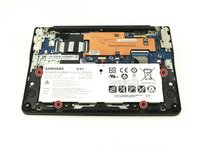
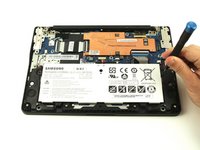
Localize a bateria e remova os quatro parafusos Phillips de 4,6 mm nos cantos que a prendem à carcaça usando uma chave Phillips #00.
-
-
-
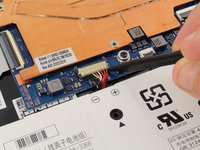
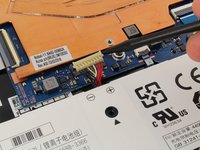
Use uma espátula para levantar suavemente o cabo de alimentação da placa-mãe.
-
-





Para a remontagem de seu dispositivo, siga estas instruções na ordem inversa.
Cancelar: não concluí este guia.
5 outras pessoas executaram este guia.

