Essa tradução foi gerada por um programa e ainda não foi revisada por uma pessoa. Falas essa língua? Dá uma olhada.

Reparo do microfone do Astro A50

jfoster2 e 3 outros colaboradores
Última atualização em 21 de jul de 2026
Visualizações: 25 mil
Visualizar Estatísticas:
- Últimas 24 horas:
- 7
- Últimos 7 dias:
- 39
- Últimos 30 dias:
- 192
- Ao todo:
- 24.882
Comentários: 8
1 comment on steps, 7 guide comments.
Go to guide commentsConcluído: 5 6
5 pessoas marcaram este guia como "concluído". Será você o próximo?
6· pessoas marcaram este guia como "concluído". Incluindo você — ótimo trabalho!
Favorites: 0 1
Ninguém favoritou (e se inscreveu) neste guia como favorito. Você será o primeiro?
1 pessoa marcou como favorito (e assinou) este guia — você!
Melhor Introdução
Melhore este guia, completando ou revendo a sua introdução.
O que você precisa
Ferramentas


-
-
-
Para substituir a bateria, é preciso desmontar completamente o auricular com o microfone. Primeiro, remova as almofadas de espuma do auricular. Faça isso puxando a espuma para fora do auricular. Isso deixará os 4 parafusos expostos. Em seguida, remova estes 4 parafusos usando uma chave Phillips pequena.
 Pergunte ao FixBot
-
-
-
Depois de remover a tampa de plástico preta, retire os dois parafusos marcados que estão visíveis. Em seguida, descole a espuma nos cantos superior esquerdo e direito do alto-falante eletrodinâmico (a espuma é colada, portanto, tenha cuidado ao removê-la). Durante a remontagem, será necessário colá-la novamente. Assim que os parafusos estiverem expostos, remova-os com a mesma chave.
-
-
-
-
Localize a porta do microfone e verifique se há algum fio desconectado. Para reconectar o fio, você precisará soldá-lo de volta à porta do microfone. Se precisar de ajuda com a soldagem, consulte o guia de soldagem aqui.
-
-


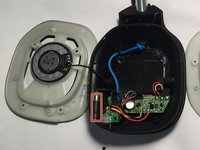
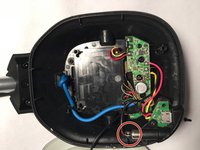
Para a remontagem de seu dispositivo, siga estas instruções na ordem inversa.
Cancelar: não concluí este guia.
5 outras pessoas executaram este guia.

Equipe

UMass Dartmouth, Team 2-5, Shastany Fall 2015 Membro de UMass Dartmouth, Team 2-5, Shastany Fall 2015
UMASSD-SHASTANY-F15S2G5
4 Membros
Autoria de 48 guias
7Comentários do guia
Hi thanks for youe guide but i have an issue . I have adtro a50 gen2 and the problem is with the mic it is not working at all and i opened the headset and i noticed that there is a timy green wire and it is not commected to any thing and when i flip the mic up and down it moves With the mic .i wish you could help me fix this problem
Same issue. That wire has broken loose from its original solder point, between the yellow and bare copper wires, along the bottom of the PCB. I am going to try to resolder it. The movement of the wire you mention is what I suspect causes the wire to break; it fatigues at the point where it is soldered from the flexing that results when you pivot the mic up and down, to mute and unmute.
Did re said wrong end of fixing your problem. Right now my Astro A50 Gen 2 does not work in the down position. If I have the mic all the way ip
in the mute position and wiggle it just about and inch towards the talk I can get the mic to work so basically the mic looks to be at 11:00 o’clock position instead of the 8:00 o clock position it should be.
Should I take apart and look for the wire that fell loose.
How can you replace the blue wire/cable in the picture? And what is it for? Is it the cable for voice/game audio?
Pritty sure the blue wire is for other ear speaker mic will be a single black wire
