Essa tradução foi gerada por um programa e ainda não foi revisada por uma pessoa. Falas essa língua? Dá uma olhada.
Introdução
Primeiro passo para consertar a furadeira RIDGID. Tudo o que é preciso é remover a carcaça...
O que você precisa
-
-
-
Remova a placa traseira.
-
Usando uma chave Torx T20, remova os quatro parafusos que prendem a placa traseira.
 Pergunte ao FixBot
-
-
-
-
Remova o punho da furadeira.
-
Com a chave Phillips #2, remova os cinco parafusos Phillips que prendem o punho da furadeira ao corpo.
-
-
-
Remova a caixa de engrenagens do corpo.
-
Com a chave Phillips #2, remova os quatro parafusos que prendem a caixa de engrenagens ao corpo.
-
-


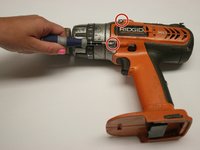
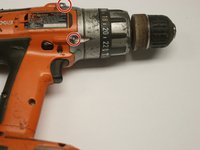
Para a remontagem de seu dispositivo, siga estas instruções na ordem inversa.
Cancelar: não concluí este guia.
2 outras pessoas executaram este guia.

Equipe

Cal Poly, Team 15-48, Garner Spring 2010 Membro de Cal Poly, Team 15-48, Garner Spring 2010
CPSU-GARNER-S10S15G48
6 Membros
Autoria de 60 guias
