Ir para o conteúdo principal
Participe da comunidade de reparos - Criar conta

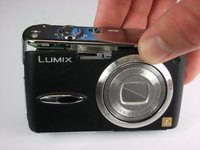
Panasonic Lumix DMC-FX01 Front Casing Replacement

O que você precisa

    1. Panasonic Lumix DMC-FX01 Front Casing Replacement, Battery: passo 1, imagem 1 %32
      • Locate the memory card and battery card latch on the bottom of the camera.

      • Slide the latch to the open position.

      Pergunte ao FixBot

      Comentar

    2. Panasonic Lumix DMC-FX01 Front Casing Replacement: passo 2, imagem 1 %32
      • Open the battery latch, and slide the battery release lever to the right.

      Pergunte ao FixBot

      Comentar

    3. Panasonic Lumix DMC-FX01 Front Casing Replacement: passo 3, imagem 1 %32
      • Remove the battery from the camera.

      Pergunte ao FixBot

      Comentar

    1. Panasonic Lumix DMC-FX01 Front Casing Replacement, Rear Casing: passo 4, imagem 1 %32
      • Remove the three 4.6 mm screws on the bottom of the camera using a Phillips #00 screwdriver.

      Pergunte ao FixBot

      Comentar

    2. Panasonic Lumix DMC-FX01 Front Casing Replacement: passo 5, imagem 1 %32
      • Remove the single 3.2 mm screw on the left side of the camera using a Phillips #00 screwdriver.

      Pergunte ao FixBot

      Comentar

    3. Panasonic Lumix DMC-FX01 Front Casing Replacement: passo 6, imagem 1 %32 Panasonic Lumix DMC-FX01 Front Casing Replacement: passo 6, imagem 2 %32
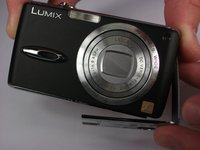
      • Remove the left side casing.

      Pergunte ao FixBot

      Comentar

    4. Panasonic Lumix DMC-FX01 Front Casing Replacement: passo 7, imagem 1 %32
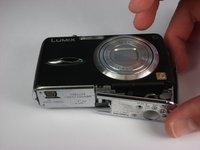
      • Remove the two 3.2 mm screws on the right side of the camera using a Phillips #00 screwdriver.

      Pergunte ao FixBot

      Comentar

    5. Panasonic Lumix DMC-FX01 Front Casing Replacement: passo 8, imagem 1 %32
      • Remove the bottom right panel.

      Pergunte ao FixBot

      Comentar

    6. Panasonic Lumix DMC-FX01 Front Casing Replacement: passo 9, imagem 1 %32 Panasonic Lumix DMC-FX01 Front Casing Replacement: passo 9, imagem 2 %32
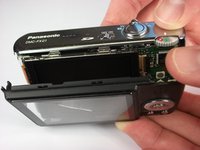
      • Gently remove the back casing.

      • Start at the bottom and carefully pry towards the top to get this piece free.

      Pergunte ao FixBot

      Comentar

    1. Panasonic Lumix DMC-FX01 Front Casing Replacement, LCD Screen: passo 10, imagem 1 %32
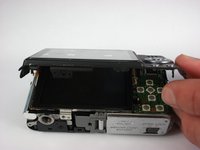
      • Gently lift up the LCD screen.

      • Using a plastic prying tool, flip up the latch that holds the thin ribbon in place.

      • It should fall out on its own or with a gentle tug.

      Pergunte ao FixBot

      Comentar

    2. Panasonic Lumix DMC-FX01 Front Casing Replacement: passo 11, imagem 1 %32
      • Gently tug the thicker ribbon to remove it from its housing.

      Pergunte ao FixBot

      Comentar

    1. Panasonic Lumix DMC-FX01 Front Casing Replacement, Front Casing: passo 12, imagem 1 %32 Panasonic Lumix DMC-FX01 Front Casing Replacement, Front Casing: passo 12, imagem 2 %32
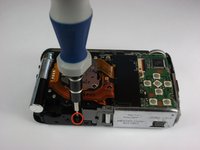
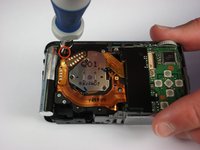
      • Remove the two black 5.4 mm screws that hold in the front faceplate using a Phillips #00 screwdriver.

      • There may be a third screw the the right of the lens assembly.

      Pergunte ao FixBot

      Comentar

    2. Panasonic Lumix DMC-FX01 Front Casing Replacement: passo 13, imagem 1 %32 Panasonic Lumix DMC-FX01 Front Casing Replacement: passo 13, imagem 2 %32 Panasonic Lumix DMC-FX01 Front Casing Replacement: passo 13, imagem 3 %32
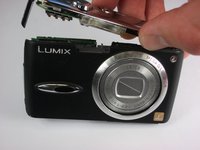
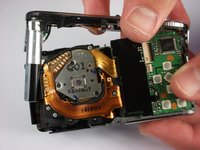
      • Carefully remove the upper assembly, which houses the buttons and the flash battery.

      Pergunte ao FixBot

      Comentar

    3. Panasonic Lumix DMC-FX01 Front Casing Replacement: passo 14, imagem 1 %32
      • Carefully remove the front casing after verifying that the thin plastic around the lens is not still attached.

      Pergunte ao FixBot

      Comentar

Conclusão

To reassemble your device, follow these instructions in reverse order.

Cancelar: não concluí este guia.

2 outras pessoas executaram este guia.

Andrew

Membro desde: 10/11/10

396 Reputação

Autoria de 4 guias

Equipe

Cal Poly, Team 9-22, Regan Fall 2010 Membro de Cal Poly, Team 9-22, Regan Fall 2010

CPSU-REGAN-F10S9G22

4 Membros

Autoria de 24 guias

0Comentários do guia

Comentar

Visualizações:

Últimas 24 horas: 4

Últimos 7 dias: 13

Últimos 30 dias: 37

Ao todo: 4,736