Ir para o conteúdo principal
Participe da comunidade de reparos - Criar conta
Palm Treo 700P Keypad Replacement

O que você precisa

  1. Palm Treo 700P Keypad Replacement, Battery: passo 1, imagem 1 %32 Palm Treo 700P Keypad Replacement, Battery: passo 1, imagem 2 %32 Palm Treo 700P Keypad Replacement, Battery: passo 1, imagem 3 %32
    • Press the button located just above the Sprint™ logo and then slide the cover down.

    Pergunte ao FixBot
  2. Palm Treo 700P Keypad Replacement: passo 2, imagem 1 %32 Palm Treo 700P Keypad Replacement: passo 2, imagem 2 %32
    • Use the small notch on the left hand side of the phone to remove the battery.

    Pergunte ao FixBot
  3. Palm Treo 700P Keypad Replacement, Back Case: passo 3, imagem 1 %32
    • Remove the stylus from the phone.

    Pergunte ao FixBot
  4. Palm Treo 700P Keypad Replacement: passo 4, imagem 1 %32
    • After removing the battery and stylus, unscrew the 5 Torx screws (using a T-5 Torx screw driver)

    Pergunte ao FixBot
  5. Palm Treo 700P Keypad Replacement: passo 5, imagem 1 %32
    • Using the spudger, remove the small rubberized patch under the antenna.

    Pergunte ao FixBot
  6. Palm Treo 700P Keypad Replacement: passo 6, imagem 1 %32
    • Unscrew the last two screws using the previous screw driver.

    Pergunte ao FixBot
  7. Palm Treo 700P Keypad Replacement: passo 7, imagem 1 %32 Palm Treo 700P Keypad Replacement: passo 7, imagem 2 %32
    • Using the plastic opening tool, gently separate the back case from the phone body.

    Pergunte ao FixBot
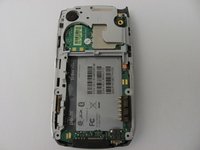
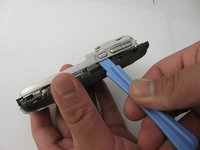
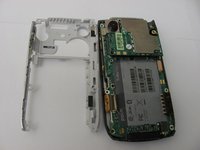
  8. Palm Treo 700P Keypad Replacement, Motherboard: passo 8, imagem 1 %32 Palm Treo 700P Keypad Replacement, Motherboard: passo 8, imagem 2 %32 Palm Treo 700P Keypad Replacement, Motherboard: passo 8, imagem 3 %32
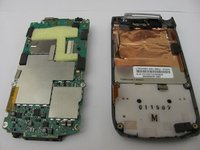
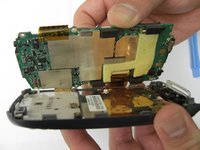
    • Using a plastic opening tool, gently edge your way between the back and border case (Picture 2) until they are completely separated (Picture 3).

    Pergunte ao FixBot
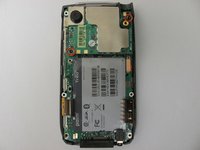
  9. Palm Treo 700P Keypad Replacement: passo 9, imagem 1 %32 Palm Treo 700P Keypad Replacement: passo 9, imagem 2 %32 Palm Treo 700P Keypad Replacement: passo 9, imagem 3 %32
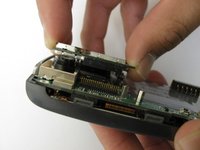
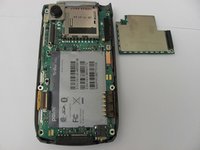
    • Remove the antenna chip by unscrewing the two screws with Torx T-5 screwdriver (Picture 1).

    • Once unscrewed, gently detach the antenna chip with your hands (Picture 2).

    Pergunte ao FixBot
  10. Palm Treo 700P Keypad Replacement: passo 10, imagem 1 %32 Palm Treo 700P Keypad Replacement: passo 10, imagem 2 %32
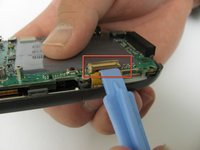
    • Use the plastic opening tool to unlock the tab holding the keyboard connection (Picture 1).

    • Once the keyboard connection is detached, use your hands to gently separate the motherboard from the back panel (Picture 2).

    Pergunte ao FixBot
  11. Palm Treo 700P Keypad Replacement: passo 11, imagem 1 %32 Palm Treo 700P Keypad Replacement: passo 11, imagem 2 %32 Palm Treo 700P Keypad Replacement: passo 11, imagem 3 %32
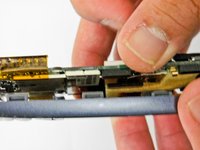
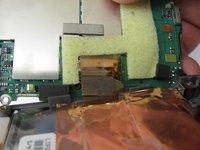
    • To completely detach the motherboard from the back panel, use the plastic opening tool to unlock the LCD connection from the motherboard (Picture 2).

    • Once the LCD connection is unlocked, the motherboard should now be completely detached from the back panel, keyboard, and LCD (Picture 3).

    Pergunte ao FixBot
  12. Palm Treo 700P Keypad Replacement, LCD: passo 12, imagem 1 %32
    • Once the motherboard is removed, the LCD should be resting on the front case of the phone.

    Pergunte ao FixBot
  13. Palm Treo 700P Keypad Replacement, Keypad: passo 13, imagem 1 %32
    • Peel the keypad from the front panel of the case

    Pergunte ao FixBot
  14. Palm Treo 700P Keypad Replacement: passo 14, imagem 1 %32
    • Using a spudger, remove the gel keyboard from the front case.

    Pergunte ao FixBot
Conclusão

To reassemble your device, follow these instructions in reverse order.

James Smith

Membro desde: 04/27/12

10 Reputação

Autoria de 3 guias

Equipe

Cal Poly, Team 12-37, Regan Spring 2012 Membro de Cal Poly, Team 12-37, Regan Spring 2012

CPSU-REGAN-S12S12G37

4 Membros

Autoria de 14 guias

0Comentários do guia

Comentar

Visualizações:

Últimas 24 horas: 1

Últimos 7 dias: 12

Últimos 30 dias: 68

Ao todo: 938