Ir para o conteúdo principal
Participe da comunidade de reparos - Criar conta

PSP 1000 Battery Replacement

O que você precisa

  1. PSP 1000 Battery Replacement, Battery: passo 1, imagem 1 %32
    • Turn the PSP over so its back is facing you.

    Pergunte ao FixBot

    Comentar

  2. PSP 1000 Battery Replacement: passo 2, imagem 1 %32 PSP 1000 Battery Replacement: passo 2, imagem 2 %32
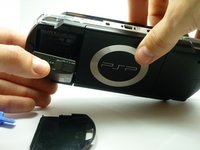
    • Locate the battery casing button on the rear-left side of the PSP.

    • Press down the button and remove the battery cover.

    Pergunte ao FixBot

    Comentar

  3. PSP 1000 Battery Replacement: passo 3, imagem 1 %32 PSP 1000 Battery Replacement: passo 3, imagem 2 %32
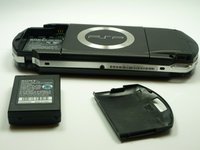
    • Using your finger, remove the battery upwards from the system as shown.

    Pergunte ao FixBot

    Comentar

Conclusão

To reassemble your device, follow these instructions in reverse order.

Cancelar: não concluí este guia.

44 outras pessoas executaram este guia.

Stephen Kazim

Membro desde: 01/14/10

2.176 Reputação

Autoria de 1 guia

Equipe

Cal Poly, Team 5-6, Forte Winter 2010 Membro de Cal Poly, Team 5-6, Forte Winter 2010

CPSU-FORTE-W10S5G6

5 Membros

Autoria de 34 guias

0Comentários do guia

Comentar

Visualizações:

Últimas 24 horas: 18

Últimos 7 dias: 125

Últimos 30 dias: 560

Ao todo: 62,225