Ir para o conteúdo principal
Participe da comunidade de reparos - Criar conta

OPPO N1 Screen Replacement

O que você precisa

  1. OPPO N1 Screen Replacement, Rear Case: passo 1, imagem 1 %32
    • Insert the plastic opening tool into the crevice. The back cover is most easily opened by starting at this location.

    Pergunte ao FixBot

    Comentar

  2. OPPO N1 Screen Replacement: passo 2, imagem 1 %32 OPPO N1 Screen Replacement: passo 2, imagem 2 %32
    • In the photo we rotated the phone ninety degrees counterclockwise.

    • Gently slide the plastic opening tool around the edge of the phone to release the back cover from the phone. You may hear some snapping noises as you release the back cover.

    • The rear case should then come free.

    Pergunte ao FixBot

    Comentar

  3. OPPO N1 Screen Replacement, Battery: passo 3, imagem 1 %32 OPPO N1 Screen Replacement, Battery: passo 3, imagem 2 %32
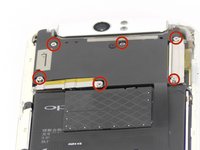
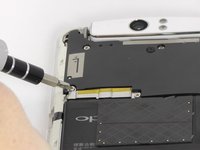
    • Remove the six 4mm long screws holding the motherboard in with the ph0 Phillips head screw driver.

    Pergunte ao FixBot

    Comentar

  4. OPPO N1 Screen Replacement: passo 4, imagem 1 %32
    Ferramenta utilizada neste passo:
    Tweezers
    $4.99
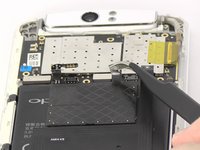
    • Use the tweezers or your fingers to remove the sliver plates.

    Pergunte ao FixBot

    Comentar

  5. OPPO N1 Screen Replacement: passo 5, imagem 1 %32
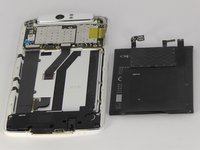
    • Remove the black plate with your fingers.

    Pergunte ao FixBot

    Comentar

  6. OPPO N1 Screen Replacement: passo 6, imagem 1 %32 OPPO N1 Screen Replacement: passo 6, imagem 2 %32 OPPO N1 Screen Replacement: passo 6, imagem 3 %32
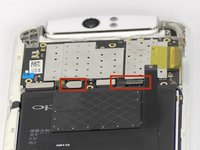
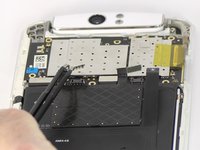
    • Use tweezers or your fingers to pull up the connector tabs.

    Pergunte ao FixBot

    Comentar

  7. OPPO N1 Screen Replacement: passo 7, imagem 1 %32 OPPO N1 Screen Replacement: passo 7, imagem 2 %32
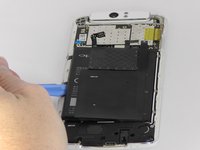
    • Use the blue opening tool to carefully pry the battery from the sticky tape that attaches it to the device.

    Pergunte ao FixBot

    Comentar

  8. OPPO N1 Screen Replacement, Motherboard: passo 8, imagem 1 %32
    Ferramenta utilizada neste passo:
    Tweezers
    $4.99
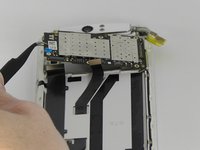
    • Use tweezers or fingers to remove the three connector tabs.

    Pergunte ao FixBot

    Comentar

  9. OPPO N1 Screen Replacement: passo 9, imagem 1 %32 OPPO N1 Screen Replacement: passo 9, imagem 2 %32
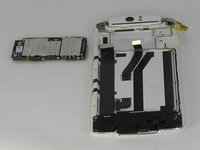
    • Use tweezers or your fingers to remove the motherboard.

    Pergunte ao FixBot

    Comentar

  10. OPPO N1 Screen Replacement, Headphone Jack and Speaker Cover: passo 10, imagem 1 %32
    • Remove the two 4mm long screws using the ph0 Phillips head screw driver.

    • Remove the six 3mm long screws using the ph0 Phillips head screw driver.

    Pergunte ao FixBot

    Comentar

  11. OPPO N1 Screen Replacement: passo 11, imagem 1 %32 OPPO N1 Screen Replacement: passo 11, imagem 2 %32
    Ferramenta utilizada neste passo:
    Tweezers
    $4.99
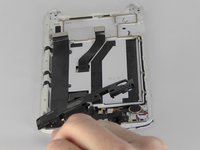
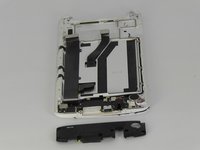
    • Use tweezers or your fingers to remove the plastic cover.

    Pergunte ao FixBot

    Comentar

  12. OPPO N1 Screen Replacement, Screen: passo 12, imagem 1 %32
    Ferramenta utilizada neste passo:
    Tweezers
    $4.99
    • Use tweezers to disconnect the connector tab.

    Pergunte ao FixBot

    Comentar

  13. OPPO N1 Screen Replacement: passo 13, imagem 1 %32
    • Use tweezers to peel the black strip from the sticky tape attached to the phone so that the black strip will slide through the phone once the screen is removed.

    • Be gentle removing the black strip at this stage. It can easily tear and it must be removed in order to remove the screen.

    Pergunte ao FixBot

    Comentar

  14. OPPO N1 Screen Replacement: passo 14, imagem 1 %32 OPPO N1 Screen Replacement: passo 14, imagem 2 %32 OPPO N1 Screen Replacement: passo 14, imagem 3 %32
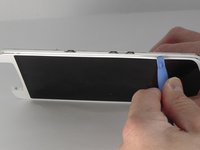
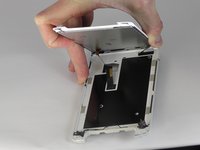
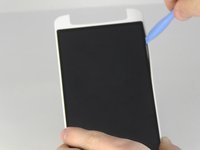
    • Insert the blue opening tool into the crevice between the screen and the main body of the phone. Gently slide the tool around the edge of the phone.

    Pergunte ao FixBot

    Comentar

  15. OPPO N1 Screen Replacement: passo 15, imagem 1 %32 OPPO N1 Screen Replacement: passo 15, imagem 2 %32
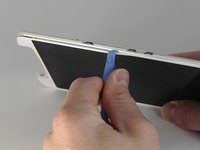
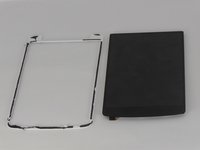
    • Insert the blue opening tool in between the black screen and the white border and slide it around the edge of the black screen.

    Pergunte ao FixBot

    Comentar

Conclusão

To reassemble your device, follow these instructions in reverse order.

Cancelar: não concluí este guia.

10 outras pessoas executaram este guia.

Joshua Stone

Membro desde: 09/26/14

1.067 Reputação

Autoria de 5 guias

Equipe

USF Tampa, Team 13-5, Staggers Fall 2014 Membro de USF Tampa, Team 13-5, Staggers Fall 2014

USFT-STAGGERS-F14S13G5

3 Membros

Autoria de 8 guias

0Comentários do guia

Comentar

Visualizações:

Últimas 24 horas: 0

Últimos 7 dias: 10

Últimos 30 dias: 48

Ao todo: 5,911