Essa tradução foi gerada por um programa e ainda não foi revisada por uma pessoa. Falas essa língua? Dá uma olhada.
Introdução
Se a sua Nvidia Shield Pro Android TV estiver superaquecendo ou se você começar a ouvir um ruído de estalo ao ligar e usar o dispositivo, utilize este guia para remover e substituir o ventilador/dissipador de calor. Tudo o que você precisará é de uma chave Torx T6 e de uma ferramenta de abertura de plástico. Você não precisará realizar passos difíceis, mas desconecte cuidadosamente a fiação multicolorida.
O que você precisa
-
-
-
Vire o seu Nvidia Shield Pro Android TV para o lado da capa traseira.
-
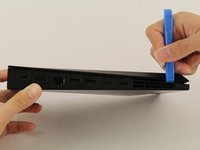
Para abrir a tampa inferior do Nvidia Shield, comece pelo canto e deslize a sua Ferramenta de abertura ao longo da fresta.
-
Se for difícil usar uma Ferramenta de abertura para abrir a tampa inferior, tente usar uma espátula de metal.
 Pergunte ao FixBot
-
-
-
-
-
Remova os cinco parafusos com uma chave Torx T6.
-
-
-
-
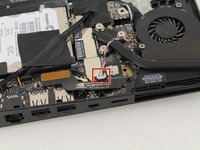
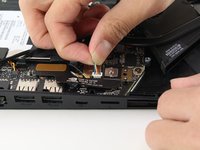
Depois de remover os parafusos, desconecte suavemente o conector da fiação multicolorida da placa-mãe.
-
-
-
Remova suavemente o ventilador/dissipador de calor do Nvidia Shield.
-
-





Para a remontagem de seu dispositivo, siga estas instruções na ordem inversa.
Cancelar: não concluí este guia.
4 outras pessoas executaram este guia.

Equipe

Cal Poly, Team S18-G2, White Winter 2020 Membro de Cal Poly, Team S18-G2, White Winter 2020
CPSU-WHITE-W20S18G2
4 Membros
Autoria de 26 guias
7Comentários do guia
Hello can you tell me where to buy the fan and the plastic case opener?
From iFixit is generally the best for plastic spudgers/openers.
as for the fan apparently the Fan Model Number is BAZA0508R5U and there's plenty available on ebay and amazon.
My version had screws in the back which I had to remove, and then I could simply slide it away from the ports in the back to open it. The inside was completely different as well, but it's a pretty simple device.
This is the 500GB 2015 version they're showing.
I have the Shield TV Pro Model: P2897 (2019 version)-> The latest model, even though it's 7 years old as of 2/1/25.
The pictures shown here looks nothing like the model I have.
You would think that even though these instructions provide detailed information on how to replace the abnormally noisy Fan that they would include information on what MODEL they're using here, unbelievable.
