Introdução
Follow these steps to remove the MicroSD from your NuVision DUO 11 as well as replacement.
O que você precisa
-
-
-
Place the flat end of a nylon spudger in the gap between the cover and the rest of the device.
-
Slide the spudger down each side until you hear numerous clicks.
-
Remove the back panel from the tablet.
 Pergunte ao FixBot
-
-
-
-
-
-
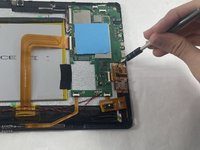
Remove the 4.8 mm screws from the MicroSD port using a JIS #000 screwdriver.
-
Unclip the male ribbon from the female ribbon port carefully.
-
Remove the MicroSD port from the tablet.
-
-


To reassemble your device, follow these instructions in reverse order.

Equipe

UMass Dartmouth, Team 7-1, Ryckebusch Spring 2023 Membro de UMass Dartmouth, Team 7-1, Ryckebusch Spring 2023
UMASSD-RYCKEBUSCH-S23S7G1
3 Membros
Autoria de 6 guias
1Comentário do guia
Does anyone know where the CMOS battery is located?
