Ir para o conteúdo principal
Participe da comunidade de reparos - Criar conta

Nostalgia GCM200 Power Button Replacement

O que você precisa

  1. Nostalgia GCM200 Power Button Replacement, Nostalgia GCM200 Disassembly: passo 1, imagem 1 %32 Nostalgia GCM200 Power Button Replacement, Nostalgia GCM200 Disassembly: passo 1, imagem 2 %32
    • Remove the two 1.3 mm Phillips #2 screws.

    • Remove the S6 spanner screw.

    • Carefully place these three screws somewhere safe to use later in reassembly.

    Pergunte ao FixBot

    Comentar

  2. Nostalgia GCM200 Power Button Replacement: passo 2, imagem 1 %32
    • Split the device in half to expose the internal parts of the device.

    • Again, there are two more Phillips screws to remove.

    Pergunte ao FixBot

    Comentar

  3. Nostalgia GCM200 Power Button Replacement: passo 3, imagem 1 %32
    • Remove the two screws from both sides of the heating coil.

    Pergunte ao FixBot

    Comentar

  4. Nostalgia GCM200 Power Button Replacement, Power Button: passo 4, imagem 1 %32
    • Split the device into 2 parts to change the power button.

    • Power button hold the other parts, so be careful.

    Pergunte ao FixBot

    Comentar

  5. Nostalgia GCM200 Power Button Replacement: passo 5, imagem 1 %32
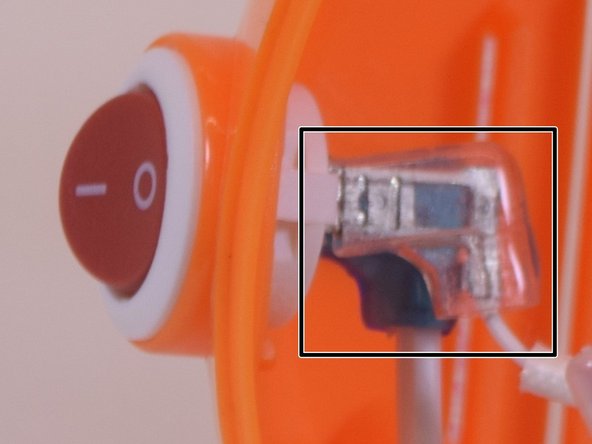
    • Remove (flexible) plastic sleeves from the inside end of the power cable.

    • You might want to use force, pull out while shaking it.

    • Inside the product, ensure you look at the power button and try to understand this step before you take action. There are two notches, push them at the same time on both sides to push the button out of the device.

    Pergunte ao FixBot

    Comentar

  6. Nostalgia GCM200 Power Button Replacement: passo 6, imagem 1 %32
    • Depress the little tab inside the top portion of the device to remove the On/Off switch.

    Pergunte ao FixBot

    Comentar

  7. Nostalgia GCM200 Power Button Replacement: passo 7, imagem 1 %32
    • Replace the power button, and put the plastic sleeves in the original position.

    • Great, you just finished replacing power button

    Pergunte ao FixBot

    Comentar

  8. Nostalgia GCM200 Power Button Replacement: passo 8, imagem 1 %32
    • To reassemble your device, follow these instructions in reverse order.

    Pergunte ao FixBot

    Comentar

Conclusão

This guide will help you to replace the power button

Cancelar: não concluí este guia.

3 outras pessoas executaram este guia.

Xingdi Zhou

Membro desde: 06/27/17

466 Reputação

Autoria de 3 guias

Equipe

UW Tacoma, Team S1-G4, Liner Summer 2017 Membro de UW Tacoma, Team S1-G4, Liner Summer 2017

UWT-LINER-SU17S1G4

4 Membros

Autoria de 5 guias

0Comentários do guia

Comentar

Visualizações:

Últimas 24 horas: 1

Últimos 7 dias: 3

Últimos 30 dias: 29

Ao todo: 392