Introdução
Replace the Wi-Fi board in your 3DS so you can get back on the Nintendo eShop.
O que você precisa
-
Ferramenta utilizada neste passo:Phillips #00 Screwdriver$5.49
-
Use a Phillips PH00 screwdriver to loosen the four screws along the top of the back cover.
 Pergunte ao FixBot
-
-
-
Grab the top edge of the back cover with your opposite hand so that the cover does not fall back into place.
-
Pull the back cover up and away from the rest of the device to remove it.
-
-
-
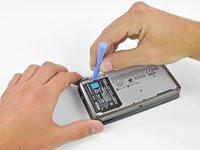
Insert a plastic opening tool into the notch in the lower case above the battery.
-
Pry the battery up with the plastic opening tool.
-
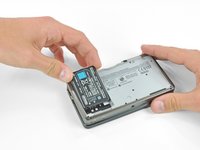
Grab the top edge of the battery and lift it out of the lower case.
-
-
-
-
Use a JIS #00 screwdriver to remove the nine 6.3 mm black screws from the lower case.
-
Use a JIS #00 screwdriver to remove the 2.4 mm silver screw above the game cartridge slot.
-
-
-
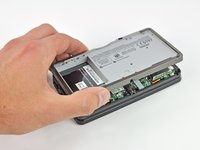
Lift the bottom edge of the lower case off the rest of the 3DS.
-
Use a plastic opening tool to pry the shoulder button ribbon cables off their sockets on the motherboard.
-
Remove the lower case from the device.
-
-
-
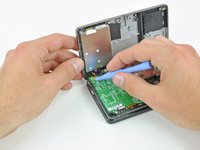
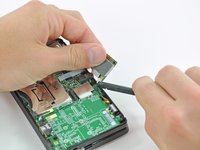
Slide the flat end of a spudger under the corner of the Wi-Fi board, and lift it away from the motherboard.
-
-
-
Use the flat end of a spudger to pry the Wi-Fi antenna cable connector off its socket on the Wi-Fi board.
-
Remove the Wi-Fi board from the 3DS.
-





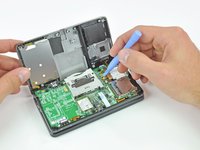


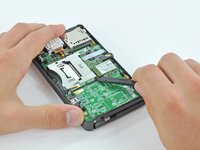
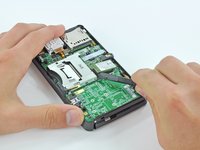


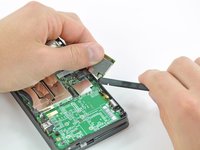
To reassemble your device, follow these instructions in reverse order.
Cancelar: não concluí este guia.
19 outras pessoas executaram este guia.

8Comentários do guia
I know someone who needs to have the wifi card removed from their DS for multiple reasons. If these steps are followed and the card is just removed will the 3DS still work to play games? They want to use it to play games only and do not want access to the internet.
Did this job, but the wireless is still not working. Any suggestions?
Get a new wi-fi card. That is the only thing I have found to work.
will a 3ds xl wireless card fit within a 3ds? I am on Ebay looking to buy a replacement part but i can't find a proper replacement.
Hi David, i know this is an older guide, but you just saved me from buying a new 3DS. The wifi board had come lose in a drop, with your help i managed to reattach it and bring it back into working condition.
Thank you!
