Ir para o conteúdo principal
Participe da comunidade de reparos - Criar conta

Nintendo 2DS Screen Replacement

O que você precisa

  1. Nintendo 2DS Screen Replacement, Battery: passo 1, imagem 1 %32
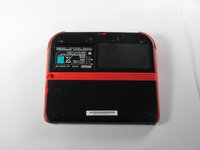
    • Remove the two Phillips captive screws securing the upper rear panel.

    • The captive screws will not completely detach from the back panel.

    Pergunte ao FixBot

    Comentar

  2. Nintendo 2DS Screen Replacement: passo 2, imagem 1 %32 Nintendo 2DS Screen Replacement: passo 2, imagem 2 %32
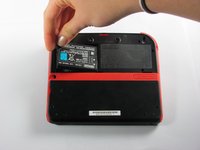
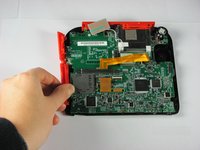
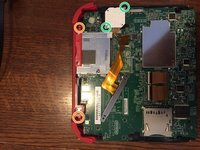
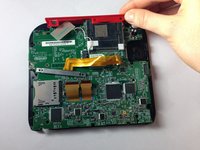
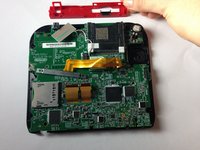
    • Hinge the upper rear panel upwards and outwards to remove it.

    Pergunte ao FixBot

    Comentar

  3. Nintendo 2DS Screen Replacement: passo 3, imagem 1 %32 Nintendo 2DS Screen Replacement: passo 3, imagem 2 %32 Nintendo 2DS Screen Replacement: passo 3, imagem 3 %32
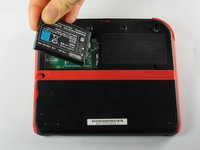
    • Remove the battery from its housing by lifting it up from the side closest to the outside edge.

    Pergunte ao FixBot

    Comentar

  4. Nintendo 2DS Screen Replacement, Rear Panel: passo 4, imagem 1 %32
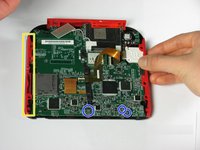
    • Remove the ten Phillips screws attaching the rear panel.

    Pergunte ao FixBot

    Comentar

  5. Nintendo 2DS Screen Replacement: passo 5, imagem 1 %32
    • The rear panel is attached to the motherboard by a ribbon cable, so be careful not to lift the rear panel too far from the device.

    • Carefully pull the rear panel straight up from the device.

    Pergunte ao FixBot

    Comentar

  6. Nintendo 2DS Screen Replacement: passo 6, imagem 1 %32
    • Use your fingernail or the flat end of a spudger to flip up the connector securing the ribbon cable to the motherboard

    • Remove the cable from the connector

    • Take the opportunity to remove the Left and Right triggers, they have hinges that may break and springs that may jump away.

    Pergunte ao FixBot

    Comentar

  7. Nintendo 2DS Screen Replacement, Remove Side Panels: passo 7, imagem 1 %32 Nintendo 2DS Screen Replacement, Remove Side Panels: passo 7, imagem 2 %32
    • Hold the side panels of the device's case with your fingers and pull outward to remove them.

    • The panels should come off easily with little force required.

    • There are three ribbon cables which have already been unplugged in this picture, disconnect these before disassembling the device further.

    Pergunte ao FixBot

    Comentar

  8. Nintendo 2DS Screen Replacement, Unscrew Motherboard: passo 8, imagem 1 %32
    • Remove the 12 brass-colored Phillips screws securing the main board.

    • Be very careful not to strip any of these screws. Stripping can occur very easily, and may make replacement of the motherboard impossible.

    • The circle pad has disappeared in this picture. Don't worry, we'll deal with that in the next step

    Pergunte ao FixBot

    Comentar

  9. Nintendo 2DS Screen Replacement, Remove Top Panel: passo 9, imagem 1 %32 Nintendo 2DS Screen Replacement, Remove Top Panel: passo 9, imagem 2 %32 Nintendo 2DS Screen Replacement, Remove Top Panel: passo 9, imagem 3 %32
    • The top panel can only be removed when the mother board is not secured.

    • There are two additional screws located on the top rail. Remove these to fully remove the buttons and top rail.

    • There are two screws holding down the joystick base that must be removed. (Be careful of the ribbon cable—it stays connected!)

    • Hold the top panel with your fingers and pull away from the device to remove it.

    • The top panel should come off easily, with very little force applied.

    Pergunte ao FixBot

    Comentar

  10. Nintendo 2DS Screen Replacement, Remove Motherboard: passo 10, imagem 1 %32 Nintendo 2DS Screen Replacement, Remove Motherboard: passo 10, imagem 2 %32
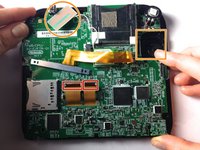
    • Detach the 2 ribbon cables by lifting the black flip connectors that hold them.

    • Lift out the rectangular board seated in the face and lift out the white square which is the joystick motor (takes a little effort). Both stay attached to the motherboard.

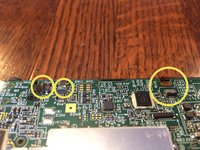
    • On some models, you'll need to remove three more tiny ribbon cables at the bottom of the screen. They are secured by flip up connectors. BE GENTLE!

    • Holding the motherboard on either side, lift to remove it.

    Pergunte ao FixBot

    Comentar

  11. Nintendo 2DS Screen Replacement, Screen Replacement: passo 11, imagem 1 %32
    • Ensure that the ribbon cables connecting the screen to the motherboard have been disconnected before removing the screen from the front panel casing.

    • Grasp the screen firmly by a corner and lift it off of the front panel of the Nintendo 2DS.

    • There should be slight resistance due to the double-sided adhesive strip on the screen.

    Pergunte ao FixBot

    Comentar

Conclusão

To reassemble your device, follow these instructions in reverse order.

Cancelar: não concluí este guia.

86 outras pessoas executaram este guia.

Fina Beauchamp

Membro desde: 01/12/15

3.377 Reputação

Autoria de 6 guias

Equipe

Cal Poly, Team 70-1, Forte Winter 2015 Membro de Cal Poly, Team 70-1, Forte Winter 2015

CPSU-FORTE-W15S70G1

4 Membros

Autoria de 36 guias

31Comentários do guia

Camera ribbon cable is very brittle, be careful.

Logan Pena - Responder Compartilhar

Thank you so much, Fina! You have done a fantastic job explaining each step incredibly well! I very much appreciate all of your efforts into skillfully describing the process of disassembling the 2DS. I was able to understand your instructions and thus was able to make a lucky kiddo super happy! Thanks again!

-Skye

Skye Leah - Responder Compartilhar

P.S. To those out there who don't have a super, ridiculously tiny (#000 screwdriver or 1.587 mm Phillips head) and don't want to have to purchase one just to complete this already daunting task, I found that using a screwdriver from a glasses repair kit worked PERFECTLY! :)

Skye Leah - Responder Compartilhar

what about a new screen?

Lord Hohenheim (Sans) - Responder Compartilhar

Once you've removed your screen, what are you supposed to do with it to clean and/or repair?

Danielle Chester - Responder Compartilhar

Comentar

Visualizações:

Últimas 24 horas: 52

Últimos 7 dias: 299

Últimos 30 dias: 1,504

Ao todo: 190,163