Ir para o conteúdo principal
Participe da comunidade de reparos - Criar conta

Ninja Professional Blender BL660 Power Button Panel Replacement

O que você precisa

  1. Ninja Professional Blender BL660 Power Button Panel Replacement, Blender Base: passo 1, imagem 1 %32 Ninja Professional Blender BL660 Power Button Panel Replacement, Blender Base: passo 1, imagem 2 %32
    • Using the Phillips #1 screwdriver, remove the 5 screws (13mm long, 6mm wide) holding the outer base.

    • Lift the base up to remove it.

    Pergunte ao FixBot

    Comentar

  2. Ninja Professional Blender BL660 Power Button Panel Replacement: passo 2, imagem 1 %32 Ninja Professional Blender BL660 Power Button Panel Replacement: passo 2, imagem 2 %32
    • Remove the midsection by pulling it up. If the section is stuck, use the iFixit plastic opening tool to pry it off.

    • Pull the power cord through the mid-section opening.

    Pergunte ao FixBot

    Comentar

  3. Ninja Professional Blender BL660 Power Button Panel Replacement: passo 3, imagem 1 %32 Ninja Professional Blender BL660 Power Button Panel Replacement: passo 3, imagem 2 %32
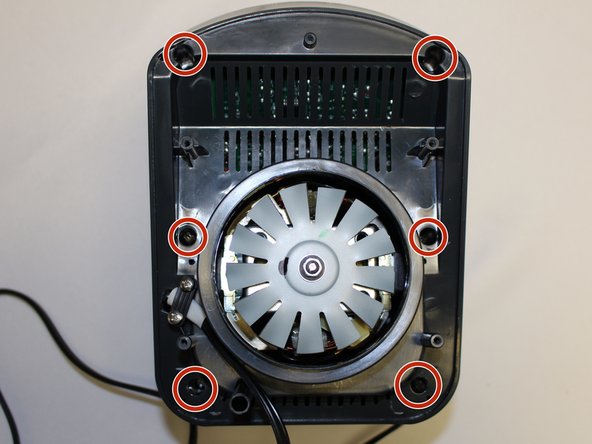
    • Using the Phillips #1 screwdriver, remove the 6 screws (13 mm long, 6 mm wide).

    Pergunte ao FixBot

    Comentar

  4. Ninja Professional Blender BL660 Power Button Panel Replacement: passo 4, imagem 1 %32 Ninja Professional Blender BL660 Power Button Panel Replacement: passo 4, imagem 2 %32
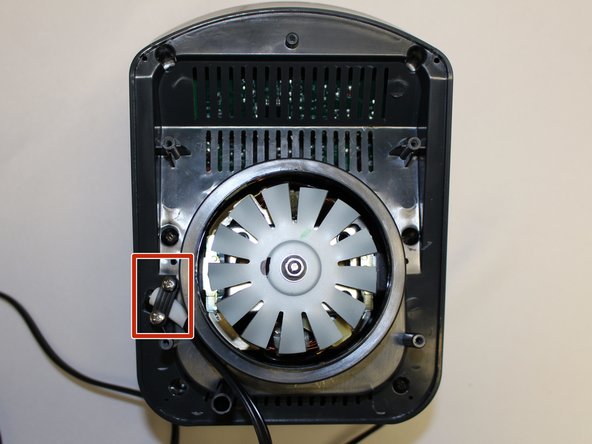
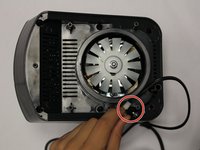
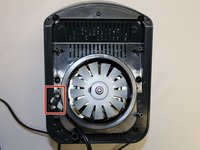
    • Using the Phillips #1 screwdriver, remove the two screws (5 mm long, 3 mm wide) holding the power cord onto the motor cover.

    Pergunte ao FixBot

    Comentar

  5. Ninja Professional Blender BL660 Power Button Panel Replacement: passo 5, imagem 1 %32 Ninja Professional Blender BL660 Power Button Panel Replacement: passo 5, imagem 2 %32
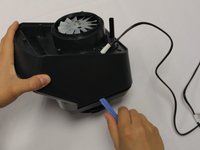
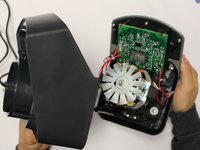
    • Using the iFixit plastic opening tool, pry the motor cover off the general housing. Once it is loose, lift it up to remove it off the base.

    • Slide the cover all the way to the end of the power cord.

    • Please note that the power cord does not completely come off the cover.

    Pergunte ao FixBot

    Comentar

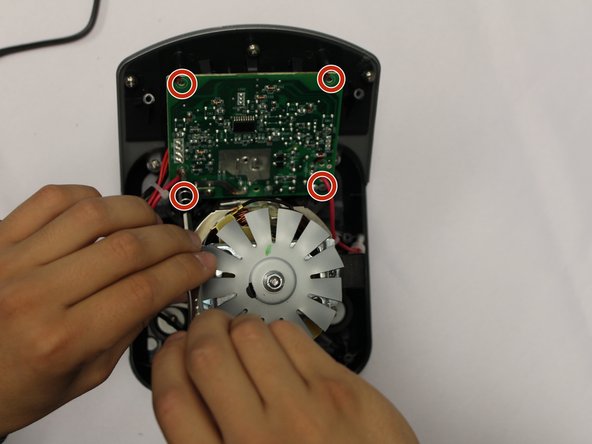
  6. Ninja Professional Blender BL660 Power Button Panel Replacement, Power Button Panel: passo 6, imagem 1 %32 Ninja Professional Blender BL660 Power Button Panel Replacement, Power Button Panel: passo 6, imagem 2 %32 Ninja Professional Blender BL660 Power Button Panel Replacement, Power Button Panel: passo 6, imagem 3 %32
    • Using the Phillips #2 screwdriver, remove the four screws holding the circuit board to the housing.

    Pergunte ao FixBot

    Comentar

  7. Ninja Professional Blender BL660 Power Button Panel Replacement: passo 7, imagem 1 %32
    • Using a pair of scissors, cut the zip ties holding the power wires in order to give the circuit board mobility.

    Pergunte ao FixBot

    Comentar

  8. Ninja Professional Blender BL660 Power Button Panel Replacement: passo 8, imagem 1 %32
    • Using a Phillips #2 screwdriver, remove the 5 screws holding the power button panel cover.

    Pergunte ao FixBot

    Comentar

  9. Ninja Professional Blender BL660 Power Button Panel Replacement: passo 9, imagem 1 %32 Ninja Professional Blender BL660 Power Button Panel Replacement: passo 9, imagem 2 %32 Ninja Professional Blender BL660 Power Button Panel Replacement: passo 9, imagem 3 %32
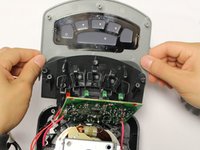
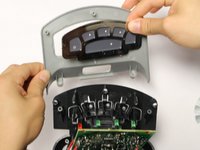
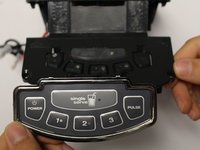
    • Pull the power button panel cover off.

    • The power button panel comes off as a whole unit. Replace as needed.

    • Ninja Kitchen does not sell the power button panel. You will have to purchase one from a third party vendor.

    Pergunte ao FixBot

    Comentar

Conclusão

To reassemble your device, follow these instructions in reverse order.

Cancelar: não concluí este guia.

0Comentários do guia

Comentar

Visualizações:

Últimas 24 horas: 1

Últimos 7 dias: 7

Últimos 30 dias: 44

Ao todo: 2,003