Introdução
Removing your memory card will allow you to replace it with a new one, access the S9700's internal memory, or remove the current data from it. It does not require extensive knowledge or special tools.
-
-
-
Power off the S9700 and situate it so that it is upside down.
-
Place your finger on the compartment door.
-
Gently push toward the front of the S9700.
-
The compartment door should spring open by itself.
 Pergunte ao FixBot
-
-
-
-
Locate the memory card. Be careful not to mistake it for the battery.
-
Push down on the memory card until it won't go down further. Don't push too hard to avoid damaging your camera
-
Release your finger and the card will pop up out of its compartment.
-
-
-
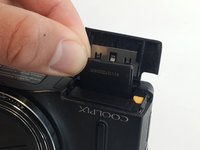
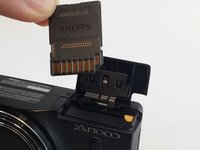
Grab your memory card with two fingers.
-
Gently pull up and your memory card will come out.
-
-


To reassemble your device, follow these instructions in reverse order.

Equipe

USF Tampa, Team 9-5, Lacy Fall 2016 Membro de USF Tampa, Team 9-5, Lacy Fall 2016
USFT-LACY-F16S9G5
4 Membros
Autoria de 10 guias
