Ir para o conteúdo principal
Participe da comunidade de reparos - Criar conta

Nikon Coolpix L330 LCD Screen Replacement

O que você precisa

  1. Nikon Coolpix L330 LCD Screen Replacement, Back Housing: passo 1, imagem 1 %32 Nikon Coolpix L330 LCD Screen Replacement, Back Housing: passo 1, imagem 2 %32 Nikon Coolpix L330 LCD Screen Replacement, Back Housing: passo 1, imagem 3 %32
    • There are six screws attaching the back housing to the camera. Remove the screws from the body with a PH000 screw head.

    • Two 1.5x2.5mm screws on the right side.

    • Two 1.5x2.5mm screws on the underside.

    • Two 1.5x2.5mm screw on the left side.

    Pergunte ao FixBot
  2. Nikon Coolpix L330 LCD Screen Replacement: passo 2, imagem 1 %32 Nikon Coolpix L330 LCD Screen Replacement: passo 2, imagem 2 %32
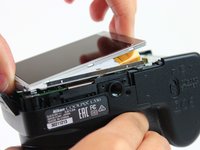
    • After removing the screws, use a metal spudger or plastic opening tool to push the back cover out.

    • The metal spudger can damage the plastic housing, so use caution when applying any pressure to it. Use a plastic opening tool to reduce the risk of damage to the housing.

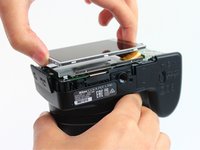
    • Remove the back housing of the camera by lifting it directly up.

    • The back cover may be slightly tight, therefore more force may be needed to lift it up.

    Pergunte ao FixBot
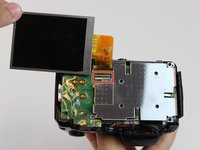
  3. Nikon Coolpix L330 LCD Screen Replacement, LCD Screen: passo 3, imagem 1 %32 Nikon Coolpix L330 LCD Screen Replacement, LCD Screen: passo 3, imagem 2 %32
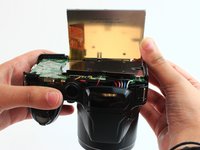
    • Insert the tips of your fingers into the space between the screen and back-plate.

    • Gently lift the screen up and out of the frame.

    • The screen is still held by a flexible display cable, therefore only lift the screen 0.5'' out of the back-plate.

    Pergunte ao FixBot
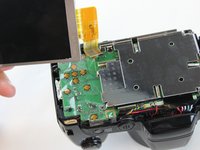
  4. Nikon Coolpix L330 LCD Screen Replacement: passo 4, imagem 1 %32 Nikon Coolpix L330 LCD Screen Replacement: passo 4, imagem 2 %32
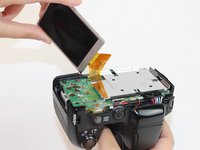
    • Tilt the screen so that the display cable forms a hinge with the backplate.

    • Rotate the display 180 degrees so that it faces you.

    Pergunte ao FixBot
  5. Nikon Coolpix L330 LCD Screen Replacement: passo 5, imagem 1 %32 Nikon Coolpix L330 LCD Screen Replacement: passo 5, imagem 2 %32 Nikon Coolpix L330 LCD Screen Replacement: passo 5, imagem 3 %32
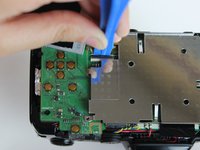
    • The display cable has a ZIF (zero insertion force) connector on the end. This has a tab that has to be pushed out before the cable can be safely removed.

    • Using a plastic opening tool or fingernail, pop up the black clip holding the display cable. This will release the cable.

    • Slide the display cable out of the connector.

    • The display cable can be damaged due to excessive bending, therefore avoid putting unnecessary strain on it.

    Pergunte ao FixBot
Conclusão

To reassemble your device, follow these instructions in reverse order.

5 outras pessoas executaram este guia.

Rajeev

Membro desde: 02/09/16

623 Reputação

Autoria de 4 guias

Equipe

USF Tampa, Team 2-10, Cagle Spring 2016 Membro de USF Tampa, Team 2-10, Cagle Spring 2016

USFT-CAGLE-S16S2G10

4 Membros

Autoria de 14 guias

1Comentário do guia

Thank you, saved me money and time

Mihai Alexandru Fustos - Responder Compartilhar

Comentar

Visualizações:

Últimas 24 horas: 2

Últimos 7 dias: 3

Últimos 30 dias: 46

Ao todo: 2,374