Introdução
The Neutab N7 Pro has a dual camera. The gadget comes with a back camera of 2 MP and a front camera of 0.3 MP. The Neutab N7 camera can sometimes break or malfunction, and must then be replaced to continue to be able to take pictures and video. Use this guide to replace the camera.
O que você precisa
-
-
-
Insert plastic opening tool and pry back case away, slowly moving the plastic opening tool along the device.
 Pergunte ao FixBot
-
-
-
-
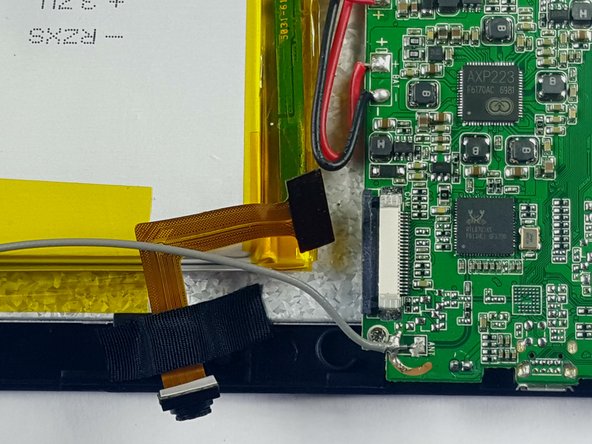
Locate the camera unit and note where it is attached to the motherboard.
-
Use a black nylon spudger to remove the adhesive holding it onto to the motherboard.
-
-
Ferramenta utilizada neste passo:Tweezers$4.99
-
Use a black nylon spudger or tweezers to release the connector holding the camera ribbon cable in place.
-
Carefully pull the ribbon cable out, removing the camera from the motherboard.
-
-



To reassemble your device, follow these instructions in reverse order.
Cancelar: não concluí este guia.
Uma outra pessoa concluiu este guia.

Equipe

USF Tampa, Team 7-1, Cheng Spring 2016 Membro de USF Tampa, Team 7-1, Cheng Spring 2016
USFT-CHENG-S16S7G1
3 Membros
Autoria de 10 guias
