Ir para o conteúdo principal
Participe da comunidade de reparos - Criar conta

Neato Botvac 80 Battery Replacement

O que você precisa

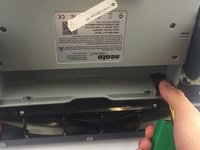
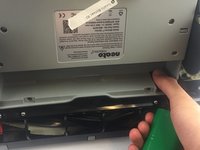
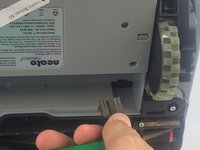
    1. Neato Botvac 80 Battery Replacement, Loosening screws: passo 1, imagem 1 %32 Neato Botvac 80 Battery Replacement, Loosening screws: passo 1, imagem 2 %32 Neato Botvac 80 Battery Replacement, Loosening screws: passo 1, imagem 3 %32
      • First, open the bin compartment and flip the switch to the off position.

      • Once you have done this, flip the robot over. Loosen the 2 screws, and lift the flap off

      • You will need to remove the 22.5mm bolts with a J1 Torx screwdriver.

      • Screws cannot be removed from the cover.

      Pergunte ao FixBot

      Comentar

    2. Neato Botvac 80 Battery Replacement, Remove battery cover: passo 2, imagem 1 %32 Neato Botvac 80 Battery Replacement, Remove battery cover: passo 2, imagem 2 %32
      • Gently lift to remove battery cover.

      Pergunte ao FixBot

      Comentar

    3. Neato Botvac 80 Battery Replacement, Removing battery: passo 3, imagem 1 %32 Neato Botvac 80 Battery Replacement, Removing battery: passo 3, imagem 2 %32 Neato Botvac 80 Battery Replacement, Removing battery: passo 3, imagem 3 %32
      • Locate battery clip.

      • Press down on latch with thumb and slide clip back.

      • Remove the battery.

      Pergunte ao FixBot

      Comentar

Conclusão

To reassemble your device, follow these instructions in reverse order.

Cancelar: não concluí este guia.

Uma outra pessoa concluiu este guia.

Equipe

USF Tampa, Team 17-5, Blackwell Spring 2017 Membro de USF Tampa, Team 17-5, Blackwell Spring 2017

USFT-BLACKWELL-S17S17G5

3 Membros

Autoria de 18 guias

0Comentários do guia

Comentar

Visualizações:

Últimas 24 horas: 0

Últimos 7 dias: 1

Últimos 30 dias: 19

Ao todo: 5,653