Essa tradução foi gerada por um programa e ainda não foi revisada por uma pessoa. Falas essa língua? Dá uma olhada.
-
-
-
Vire o celular de modo que a capa traseira fique voltada para você.
-
Pressione o botão de liberação na capa traseira e, simultaneamente, puxe a capa para baixo.
-
Remova a capa traseira.
 Pergunte ao FixBot
-
-
-
-
Aperte as laterais da parte inferior da bateria e puxe para cima.
-
-
-
-
-
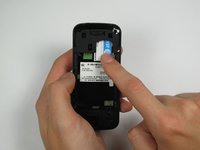
Pressione e deslize o cartão SIM para baixo.
-
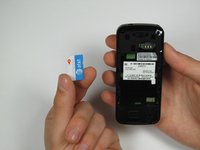
Remova o cartão SIM.
-
-


Conclusão
Para a remontagem de seu dispositivo, siga estas instruções na ordem inversa.

Equipe

Cal Poly, Team 12-40, Regan Spring 2012 Membro de Cal Poly, Team 12-40, Regan Spring 2012
CPSU-REGAN-S12S12G40
4 Membros
Autoria de 48 guias
