Ir para o conteúdo principal
Participe da comunidade de reparos - Criar conta

MacBook Air Models A1237 and A1304 Speaker Replacement

O que você precisa

  1. MacBook Air Models A1237 and A1304 Speaker Replacement, Lower Case: passo 1, imagem 1 %32
    • Unplug your MacBook Air and power it off before you proceed.

    • Remove ten Phillips screws securing the lower case to the MacBook Air:

    • Six 2.8 mm screws

    • Two 3.8 mm screws

    • Two 5.4 mm screws

    Pergunte ao FixBot

    Comentar

  2. MacBook Air Models A1237 and A1304 Speaker Replacement: passo 2, imagem 1 %32 MacBook Air Models A1237 and A1304 Speaker Replacement: passo 2, imagem 2 %32
    • Slightly lift the lower case near the vents and push it toward the rear of the computer to free the mounting tabs.

    Pergunte ao FixBot

    Comentar

  3. MacBook Air Models A1237 and A1304 Speaker Replacement, Battery: passo 3, imagem 1 %32
    • Disconnect the battery connector by pulling it straight out of its socket.

    Pergunte ao FixBot

    Comentar

  4. MacBook Air Models A1237 and A1304 Speaker Replacement: passo 4, imagem 1 %32
    • Remove the following nine screws securing the battery to the Air:

    • Four 2.9 mm Phillips.

    • Four 3.8 mm Phillips.

    • One 7.2 mm Phillips.

    Pergunte ao FixBot

    Comentar

  5. MacBook Air Models A1237 and A1304 Speaker Replacement: passo 5, imagem 1 %32
    • Lift the battery out of the Air.

    • If you're installing a new battery, you should calibrate it after installation:

    • Charge it to 100%, and then keep charging it for at least 2 more hours. Then, unplug and use it normally to drain the battery. When you see the low battery warning, save your work, and keep your laptop on until it goes to sleep due to low battery. Wait at least 5 hours, then charge your laptop uninterrupted to 100%.

    • If you notice any unusual behavior or problems after installing your new battery, you may need to reset your MacBook's SMC.

    Pergunte ao FixBot

    Comentar

  6. MacBook Air Models A1237 and A1304 Speaker Replacement, Speaker: passo 6, imagem 1 %32
    • Remove the following two screws securing the speaker assembly to the upper case.

    • One 3 mm Phillips.

    • One 5.8 mm Phillips.

    Pergunte ao FixBot

    Comentar

  7. MacBook Air Models A1237 and A1304 Speaker Replacement: passo 7, imagem 1 %32 MacBook Air Models A1237 and A1304 Speaker Replacement: passo 7, imagem 2 %32
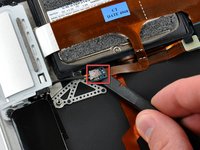
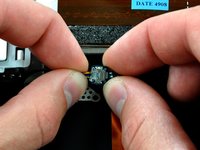
    • Use a spudger to lift the audio-out connector board off the adhesive that secures it to the hard drive bracket.

    • Disconnect the audio out connector from its socket.

    Pergunte ao FixBot

    Comentar

  8. MacBook Air Models A1237 and A1304 Speaker Replacement: passo 8, imagem 1 %32 MacBook Air Models A1237 and A1304 Speaker Replacement: passo 8, imagem 2 %32
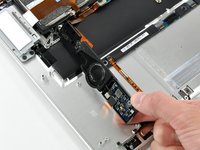
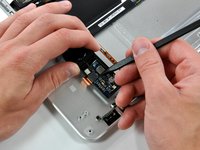
    • Rotate the speaker assembly toward the center of the Air.

    • Use a spudger to pry the speaker cable connector up off the audio board.

    Pergunte ao FixBot

    Comentar

  9. MacBook Air Models A1237 and A1304 Speaker Replacement, Speaker: passo 9, imagem 1 %32
    • Use the tip of a spudger to pry the speaker connector up off the audio board.

    Pergunte ao FixBot

    Comentar

  10. MacBook Air Models A1237 and A1304 Speaker Replacement: passo 10, imagem 1 %32
    • Use the tip of a spudger to separate the audio board from the adhesive securing it to the logic board.

    Pergunte ao FixBot

    Comentar

  11. MacBook Air Models A1237 and A1304 Speaker Replacement: passo 11, imagem 1 %32
    • Disconnect the audio-out cable by pulling the male end straight away from its socket on the audio board.

    Pergunte ao FixBot

    Comentar

  12. MacBook Air Models A1237 and A1304 Speaker Replacement: passo 12, imagem 1 %32
    • Speaker assembly remains.

    Pergunte ao FixBot

    Comentar

Conclusão

To reassemble your device, follow these instructions in reverse order.

Cancelar: não concluí este guia.

5 outras pessoas executaram este guia.

0Comentários do guia

Comentar

Visualizações:

Últimas 24 horas: 2

Últimos 7 dias: 10

Últimos 30 dias: 46

Ao todo: 23,933