
MacBook Air Models A1237 and A1304 AirPort/Bluetooth Board Replacement

Última atualização em 2 de abr de 2015
Visualizações: 39 mil
Visualizar Estatísticas:
- Últimas 24 horas:
- 4
- Últimos 7 dias:
- 27
- Últimos 30 dias:
- 102
- Ao todo:
- 38.877
Comentários: 0
Ninguém deixou comentários sobre este guia. Você será o primeiro?
Go to guide commentsConcluído: 10 11
10 pessoas marcaram este guia como "concluído". Será você o próximo?
11· pessoas marcaram este guia como "concluído". Incluindo você — ótimo trabalho!
Favorites: 11 12
11 pessoas favoritaram (e se inscreveram) neste guia. Você será o próximo?
12 pessoas marcaram como favorito (e assinaram) este guia - incluindo você!
Introdução
Ir para o passo 1 ↓Reclaim your singular source of internet connectivity by replacing your broken AirPort/Bluetooth board.
O que você precisa


-
-
-
Remove ten Phillips screws securing the lower case to the MacBook Air:
-
Six 2.8 mm screws
-
Two 3.8 mm screws
-
Two 5.4 mm screws
 Pergunte ao FixBot
-
-
-
Slightly lift the lower case near the vents and push it toward the rear of the computer to free the mounting tabs.
-
-
-
-
-
Disconnect the battery connector by pulling it straight out of its socket.
-
-
-
-
Remove the following nine screws securing the battery to the Air:
-
Four 2.9 mm Phillips.
-
Four 3.8 mm Phillips.
-
One 7.2 mm Phillips.
-
-
-
Lift the battery out of the Air.
-
Charge it to 100%, and then keep charging it for at least 2 more hours. Then, unplug and use it normally to drain the battery. When you see the low battery warning, save your work, and keep your laptop on until it goes to sleep due to low battery. Wait at least 5 hours, then charge your laptop uninterrupted to 100%.
-
If you notice any unusual behavior or problems after installing your new battery, you may need to reset your MacBook's SMC.
-
-
-
-
-
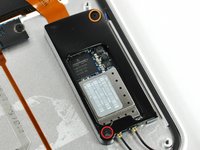
Remove the two following screws securing the AirPort/Bluetooth board bracket to the upper case:
-
One 4.7 mm Phillips.
-
One 3.9 mm Phillips.
-
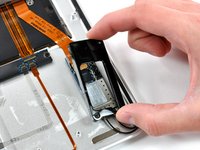
Lift the AirPort/Bluetooth bracket out of the upper case.
-
-
-
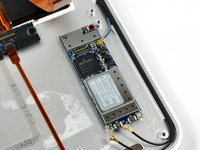
Using a spudger, pry the AirPort/Bluetooth ribbon cable connector straight up off the AirPort/Bluetooth board.
-
-
-
Use a spudger to pry the three antenna cables up off the AirPort/Bluetooth board.
-
-
-
Remove the single 3.2 mm Phillips screw from the upper right corner of the AirPort/Bluetooth board.
-
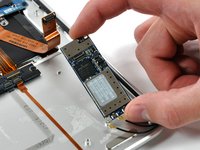
Lift the AirPort/Bluetooth board out of the upper case.
-
-




To reassemble your device, follow these instructions in reverse order.
Cancelar: não concluí este guia.
10 outras pessoas executaram este guia.

