Ir para o conteúdo principal
Participe da comunidade de reparos - Criar conta

MSI GP60 2PE Leopard RAM Replacement

O que você precisa

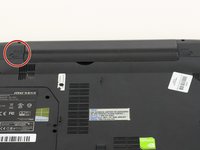
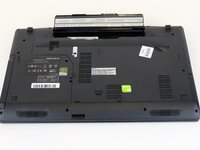
  1. MSI GP60 2PE Leopard RAM Replacement, Battery: passo 1, imagem 1 %32
    • Flip MSI GP60 2PE Leopard, so that the back is facing up.

    Pergunte ao FixBot
    Comentar

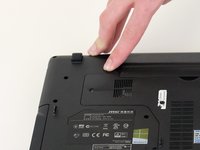
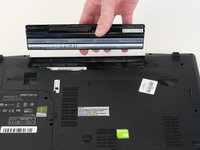
  2. MSI GP60 2PE Leopard RAM Replacement: passo 2, imagem 1 %32
    • Find the unlock tab located on the upper right side of the device, then slide it to the right.

    Pergunte ao FixBot
    Comentar

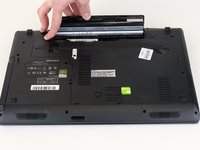
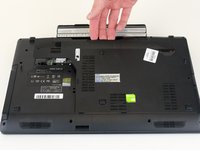
  3. MSI GP60 2PE Leopard RAM Replacement: passo 3, imagem 1 %32 MSI GP60 2PE Leopard RAM Replacement: passo 3, imagem 2 %32 MSI GP60 2PE Leopard RAM Replacement: passo 3, imagem 3 %32
    • Slide and hold the release tab on the left side of the battery, so that you can remove the battery.

    Pergunte ao FixBot

    Comentar

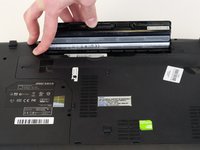
  4. MSI GP60 2PE Leopard RAM Replacement: passo 4, imagem 1 %32 MSI GP60 2PE Leopard RAM Replacement: passo 4, imagem 2 %32 MSI GP60 2PE Leopard RAM Replacement: passo 4, imagem 3 %32
    • While holding the release tab, remove the battery slowly.

    Pergunte ao FixBot

    Comentar

  5. MSI GP60 2PE Leopard RAM Replacement, Back Panel: passo 5, imagem 1 %32
    • Flip the device over so the back is facing up.

    Pergunte ao FixBot

    Comentar

  6. MSI GP60 2PE Leopard RAM Replacement: passo 6, imagem 1 %32 MSI GP60 2PE Leopard RAM Replacement: passo 6, imagem 2 %32
    • Remove the four 5mm screws from the back of the device using a Phillips #00 screwdriver.

    • There is a screw located under the battery; lift the battery up to access it.

    Pergunte ao FixBot

    Comentar

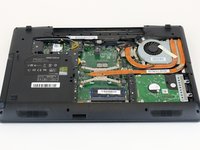
  7. MSI GP60 2PE Leopard RAM Replacement: passo 7, imagem 1 %32 MSI GP60 2PE Leopard RAM Replacement: passo 7, imagem 2 %32
    • Once all four screws are removed, lift the back off.

    Pergunte ao FixBot

    Comentar

  8. MSI GP60 2PE Leopard RAM Replacement, RAM: passo 8, imagem 1 %32
    • Press the tabs on the side of the RAM to remove it.

    Pergunte ao FixBot

    Comentar

  9. MSI GP60 2PE Leopard RAM Replacement: passo 9, imagem 1 %32
    • Slide the RAM out of the slot carefully.

    Pergunte ao FixBot

    Comentar

Conclusão

To reassemble your device, follow these instructions in reverse order.

Cancelar: não concluí este guia.

3 outras pessoas executaram este guia.

0Comentários do guia

Comentar

Visualizações:

Últimas 24 horas: 2

Últimos 7 dias: 10

Últimos 30 dias: 65

Ao todo: 1,669