Ir para o conteúdo principal
Participe da comunidade de reparos - Criar conta

Logitech Mouse MX1000 Disassembly

O que você precisa

    1. Logitech Mouse MX1000 Disassembly, Open the housing: passo 1, imagem 1 %32 Logitech Mouse MX1000 Disassembly, Open the housing: passo 1, imagem 2 %32
      • There are four screws hidden on the bottom part of the mouse. Two are below the sticker, the last two are below the bottom pads.

      Pergunte ao FixBot

      Comentar

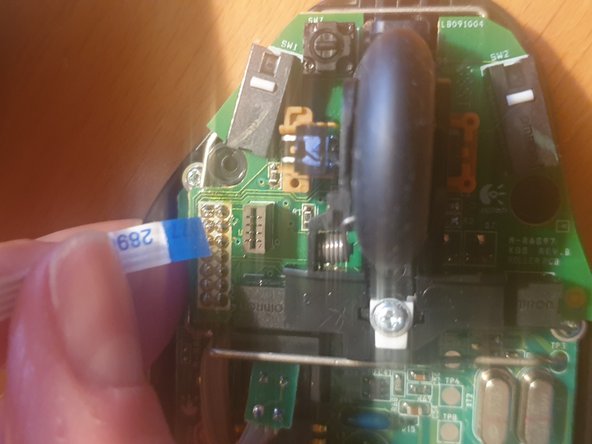
    2. Logitech Mouse MX1000 Disassembly, Disconnect the cables: passo 2, imagem 1 %32 Logitech Mouse MX1000 Disassembly, Disconnect the cables: passo 2, imagem 2 %32 Logitech Mouse MX1000 Disassembly, Disconnect the cables: passo 2, imagem 3 %32
      • Once the scews removed, carefully open the housing. Some cables hold both pieces together

      • First remove the tricolor battery cable

      • Then carefully remove the ribbon cable

      Pergunte ao FixBot

      Comentar

    3. Logitech Mouse MX1000 Disassembly, Remove the battery: passo 3, imagem 1 %32
      • To remove the battery cover, two more screws need to be removed.

      • The battery is then held in place with a sticker within the housing.

      Pergunte ao FixBot

      Comentar

    4. Logitech Mouse MX1000 Disassembly, Remove the board from the housing: passo 4, imagem 1 %32 Logitech Mouse MX1000 Disassembly, Remove the board from the housing: passo 4, imagem 2 %32 Logitech Mouse MX1000 Disassembly, Remove the board from the housing: passo 4, imagem 3 %32
      • Remove the three screws (red circles) holding the board in place

      • Remove the wheel and the white piece of plastic holding it down

      • A clip (yellow circle) further holds it down

      • Finally you need to unsolder the charging pads (orange circles)

      Pergunte ao FixBot

      Comentar

    5. Logitech Mouse MX1000 Disassembly, You are done: passo 5, imagem 1 %32
      • Congrats, you now fully dissassembled your logitech mouse!

      Pergunte ao FixBot

      Comentar

Conclusão

To reassemble your device, follow these instructions in reverse order.

Cancelar: não concluí este guia.

lija31415

Membro desde: 12/17/20

313 Reputação

Autoria de 1 guia

0Comentários do guia

Comentar

Visualizações:

Últimas 24 horas: 0

Últimos 7 dias: 11

Últimos 30 dias: 50

Ao todo: 1,770