Ir para o conteúdo principal
Participe da comunidade de reparos - Criar conta

Logitech G603 Wheel Encoder Replacement

O que você precisa

  1. Logitech G603 Wheel Encoder Replacement, Remove Top Cover & Batteries: passo 1, imagem 1 %32
    • Remove magnetic top cover, batteries, and wireless receiver (if currently stored inside the mouse)

    Pergunte ao FixBot

    Comentar

  2. Logitech G603 Wheel Encoder Replacement, Remove Mouse Feet: passo 2, imagem 1 %32 Logitech G603 Wheel Encoder Replacement, Remove Mouse Feet: passo 2, imagem 2 %32 Logitech G603 Wheel Encoder Replacement, Remove Mouse Feet: passo 2, imagem 3 %32
    • Carefully remove the feet to reveal the 4 screws holding the top and bottom shells together

    • NOTE: These feet can be removed carefully enough to be reused. Only the top and bottom feet need to be removed, not the one around the sensor

    Pergunte ao FixBot

    Comentar

  3. Logitech G603 Wheel Encoder Replacement, Remove the four Phillips #00 Screws: passo 3, imagem 1 %32
    • Use Phillips #00 to remove the four bottom screws

    Pergunte ao FixBot

    Comentar

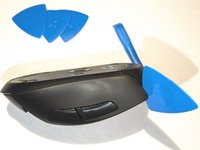
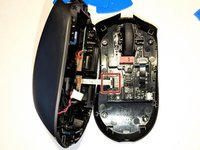
  4. Logitech G603 Wheel Encoder Replacement, Separate the Top and Bottom Shells: passo 4, imagem 1 %32 Logitech G603 Wheel Encoder Replacement, Separate the Top and Bottom Shells: passo 4, imagem 2 %32 Logitech G603 Wheel Encoder Replacement, Separate the Top and Bottom Shells: passo 4, imagem 3 %32
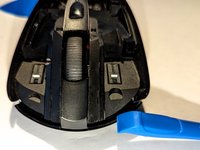
    • Start at the top above the left and right click and slowly work your way around the shells until they are separated

    • Be careful not to damage the power connector or ribbon cable going from the top shell's boards/battery to the bottom shell's board

    Pergunte ao FixBot

    Comentar

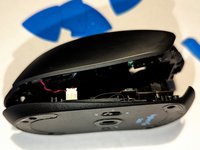
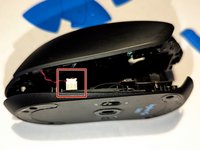
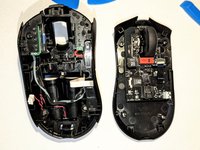
  5. Logitech G603 Wheel Encoder Replacement, Unplug Power and Ribbon Cables: passo 5, imagem 1 %32 Logitech G603 Wheel Encoder Replacement, Unplug Power and Ribbon Cables: passo 5, imagem 2 %32 Logitech G603 Wheel Encoder Replacement, Unplug Power and Ribbon Cables: passo 5, imagem 3 %32
    • Start with the red and black power cable and gently pull it out

    • Once power cable is removed, you should be able to unfold the two halves and unplug the white ribbon cable

    Pergunte ao FixBot

    Comentar

  6. Logitech G603 Wheel Encoder Replacement, Remove Encoder Ribbon Cable: passo 6, imagem 1 %32
    • Gently pull out the black ribbon cable connecting the encoder board to the main board

    Pergunte ao FixBot

    Comentar

  7. Logitech G603 Wheel Encoder Replacement, Remove 5 Phillips #00 Screws: passo 7, imagem 1 %32
    • Remove the Phillips #00 screws holding the encoder board in place

    Pergunte ao FixBot

    Comentar

  8. Logitech G603 Wheel Encoder Replacement, Remove Encoder Board & Wheel: passo 8, imagem 1 %32
    • Remove the encoder board from the bottom shell

    • Gently remove the wheel from the older encoder board

    • NOTE: The old wheel can be reused in the replacement encoder board

    Pergunte ao FixBot

    Comentar

Conclusão

To reassemble your device, follow these instructions in reverse order.

Cancelar: não concluí este guia.

Uma outra pessoa concluiu este guia.

Jim

Membro desde: 06/17/23

331 Reputação

Autoria de 2 guias

1Comentário do guia

In my case, cleaning the encoder plate in an ultrasonic bath did the trick.

dobromir.dombek - Responder Compartilhar

Comentar

Visualizações:

Últimas 24 horas: 7

Últimos 7 dias: 51

Últimos 30 dias: 217

Ao todo: 6,200