Ir para o conteúdo principal
Participe da comunidade de reparos - Criar conta

Logitech G502 Proteus Core Mouse Feet Replacement

O que você precisa

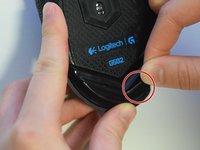
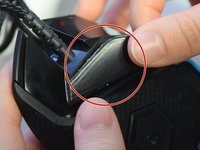
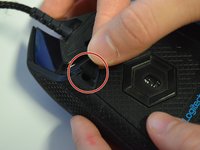
    1. Logitech G502 Proteus Core Mouse Feet Replacement, Mouse Feet: passo 1, imagem 1 %32 Logitech G502 Proteus Core Mouse Feet Replacement, Mouse Feet: passo 1, imagem 2 %32 Logitech G502 Proteus Core Mouse Feet Replacement, Mouse Feet: passo 1, imagem 3 %32
      • Use your fingers or a nylon spudger to peel the old feet off all three corners where the screw holes are exposed.

      Pergunte ao FixBot

      Comentar

    2. Logitech G502 Proteus Core Mouse Feet Replacement: passo 2, imagem 1 %32 Logitech G502 Proteus Core Mouse Feet Replacement: passo 2, imagem 2 %32 Logitech G502 Proteus Core Mouse Feet Replacement: passo 2, imagem 3 %32
      • Peel the backing off the new mouse feet to reveal the adhesive.

      Pergunte ao FixBot

      Comentar

    3. Logitech G502 Proteus Core Mouse Feet Replacement: passo 3, imagem 1 %32 Logitech G502 Proteus Core Mouse Feet Replacement: passo 3, imagem 2 %32 Logitech G502 Proteus Core Mouse Feet Replacement: passo 3, imagem 3 %32
      • Apply the new mouse feet to their designated areas based on shape.

      Pergunte ao FixBot

      Comentar

    4. Logitech G502 Proteus Core Mouse Feet Replacement: passo 4, imagem 1 %32
      • Apply even pressure across the mouse feet to ensure adherence.

      Pergunte ao FixBot

      Comentar

    5. Logitech G502 Proteus Core Mouse Feet Replacement: passo 5, imagem 1 %32
      • Let adhesive sit for about 5-10 minutes with applied pressure.

      Pergunte ao FixBot

      Comentar

Conclusão

To reassemble your device, follow these instructions in reverse order.

Cancelar: não concluí este guia.

4 outras pessoas executaram este guia.

Sage Farray

Membro desde: 04/10/17

547 Reputação

Autoria de 3 guias

Equipe

UW Tacoma, Team S3-G1, Liner Spring 2017 Membro de UW Tacoma, Team S3-G1, Liner Spring 2017

UWT-LINER-S17S3G1

4 Membros

Autoria de 17 guias

1Comentário do guia

You completely omitted half of the feet located on the mouse. The ones left out are the 3 located on the removable panel: there are 2 “v” shaped ones around the sensor and the one to the right of the “v” shapes.

Robert - Responder Compartilhar

Comentar

Visualizações:

Últimas 24 horas: 3

Últimos 7 dias: 13

Últimos 30 dias: 57

Ao todo: 11,852