Ir para o conteúdo principal
Participe da comunidade de reparos - Criar conta

Logitech G400s Mouse Cable Replacement

O que você precisa

  1. Logitech G400s Mouse Cable Replacement, Mouse Cable: passo 1, imagem 1 %32
    • Use a Jimmy to remove the mouse feet.

    • Be careful to remove any film left by the mouse feet as well.

    Pergunte ao FixBot
  2. Logitech G400s Mouse Cable Replacement: passo 2, imagem 1 %32
    • Remove the bottom mouse foot using a Jimmy and the same technique as in Step 1.

    Pergunte ao FixBot
  3. Logitech G400s Mouse Cable Replacement: passo 3, imagem 1 %32
    • Use a Phillips #1 screwdriver to remove the three 5 mm Philips screws on the bottom surface.

    Pergunte ao FixBot
  4. Logitech G400s Mouse Cable Replacement: passo 4, imagem 1 %32
    • Gently pull the upper shell away from the bottom platform.

    Pergunte ao FixBot
  5. Logitech G400s Mouse Cable Replacement: passo 5, imagem 1 %32
    • This is what the G400s will look like when the top shell is taken off.

    Pergunte ao FixBot
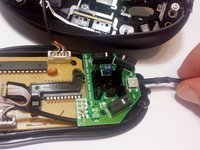
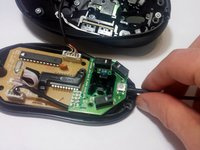
  6. Logitech G400s Mouse Cable Replacement: passo 6, imagem 1 %32 Logitech G400s Mouse Cable Replacement: passo 6, imagem 2 %32
    • Push the cable into its proper place inside the mouse shell.

    Pergunte ao FixBot
Conclusão

To reassemble your device, follow these instructions in reverse order.

Uma outra pessoa concluiu este guia.

Max Evans

Membro desde: 09/28/16

433 Reputação

Autoria de 3 guias

Equipe

USF Tampa, Team 16-7, Eyestone Fall 2016 Membro de USF Tampa, Team 16-7, Eyestone Fall 2016

USFT-EYESTONE-F16S16G7

1 Membro

Autoria de 9 guias

0Comentários do guia

Comentar

Visualizações:

Últimas 24 horas: 0

Últimos 7 dias: 10

Últimos 30 dias: 60

Ao todo: 5,012