Ir para o conteúdo principal
Participe da comunidade de reparos - Criar conta

Lenovo ThinkPad T500 Screen Replacement

O que você precisa

  1. Lenovo ThinkPad T500 Screen Replacement, Screen: passo 1, imagem 1 %32
    • Remove the eight 14mm screws using the Phillips #0 Screwdriver.

    Pergunte ao FixBot

    Comentar

  2. Lenovo ThinkPad T500 Screen Replacement: passo 2, imagem 1 %32
    • Lift the palm rest panel up.

    • Be sure to lift the panel slowly; there is a ribbon cable attached to the bottom.

    Pergunte ao FixBot

    Comentar

  3. Lenovo ThinkPad T500 Screen Replacement: passo 3, imagem 1 %32
    • Use the spudger to disconnect the ribbon cable.

    Pergunte ao FixBot

    Comentar

  4. Lenovo ThinkPad T500 Screen Replacement: passo 4, imagem 1 %32
    • With the panel disconnected, lift the keyboard.

    • As with the panel, lift the keyboard slowly; there is a ribbon cable attached to the bottom.

    Pergunte ao FixBot

    Comentar

  5. Lenovo ThinkPad T500 Screen Replacement: passo 5, imagem 1 %32
    • Disconnect the ribbon cable with the spudger.

    Pergunte ao FixBot

    Comentar

  6. Lenovo ThinkPad T500 Screen Replacement: passo 6, imagem 1 %32 Lenovo ThinkPad T500 Screen Replacement: passo 6, imagem 2 %32
    • Remove the keyboard and the panel.

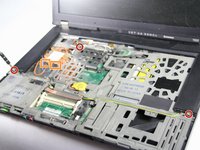
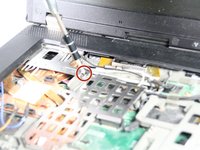
    • Using the Phillips #0 Screwdriver, remove the three 3 mm screws that are at the bottom sides and near the top-left of the speaker cover.

    • Disconnect the orange and blue cables next to the left side of the speaker cover.

    Pergunte ao FixBot

    Comentar

  7. Lenovo ThinkPad T500 Screen Replacement: passo 7, imagem 1 %32
    • Remove the speaker cover.

    Pergunte ao FixBot

    Comentar

  8. Lenovo ThinkPad T500 Screen Replacement: passo 8, imagem 1 %32
    • Remove the two 3mm screws on the left speaker with the Phillips #0 Screwdriver.

    Pergunte ao FixBot

    Comentar

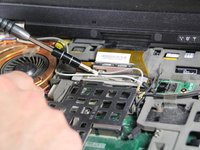
  9. Lenovo ThinkPad T500 Screen Replacement: passo 9, imagem 1 %32 Lenovo ThinkPad T500 Screen Replacement: passo 9, imagem 2 %32
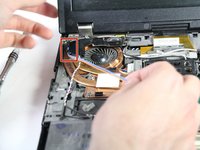
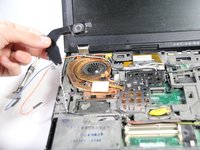
    • Detach the blue and orange cables from the left speaker's clamps.

    Pergunte ao FixBot

    Comentar

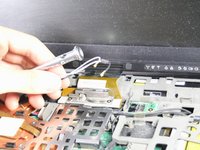
  10. Lenovo ThinkPad T500 Screen Replacement: passo 10, imagem 1 %32 Lenovo ThinkPad T500 Screen Replacement: passo 10, imagem 2 %32
    • Using the Phillips #0 Screwdriver, lift the metal fastener up and remove the black and white wires.

    Pergunte ao FixBot

    Comentar

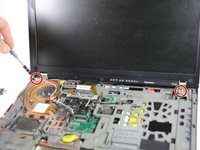
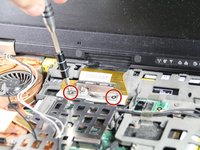
  11. Lenovo ThinkPad T500 Screen Replacement: passo 11, imagem 1 %32 Lenovo ThinkPad T500 Screen Replacement: passo 11, imagem 2 %32
    • Remove the two 3mm screws next to the lid hinges, as well as the two 3mm screws on the lid's ribbon cable.

    Pergunte ao FixBot

    Comentar

  12. Lenovo ThinkPad T500 Screen Replacement: passo 12, imagem 1 %32
    • Use the spudger to detach the screen's ribbon cable.

    Pergunte ao FixBot

    Comentar

  13. Lenovo ThinkPad T500 Screen Replacement: passo 13, imagem 1 %32
    • Remove the screen.

    Pergunte ao FixBot

    Comentar

Conclusão

To reassemble your device, follow these instructions in reverse order.

Cancelar: não concluí este guia.

7 outras pessoas executaram este guia.

nicO

Membro desde: 04/14/15

15.990 Reputação

Autoria de 89 guias

1Comentário do guia

It was of good help, but be aware that you need to remove two screws on the back before removing the speaker cover. If not you will break the cover.

Bjørnar Valand - Responder Compartilhar

Comentar

Visualizações:

Últimas 24 horas: 2

Últimos 7 dias: 14

Últimos 30 dias: 70

Ao todo: 5,696