Introdução
If your LeapFrog Scribble and Write won't power on, there may be an issue with the batteries. Your batteries may be drained and in need of replacing, or the battery compartment could have a buildup of debris (dirt, dust, etc.) preventing the batteries from working properly.
O que você precisa
-
-
-
Use a Phillips head screwdriver to remove the screw from the battery compartment on the back of the toy.
 Pergunte ao FixBot
-
-
-
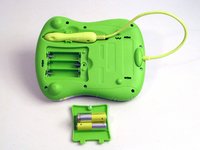
Remove the back cover from the device.
-
Remove the batteries from the toy.
-
-
-
-
In a small cup, combine a little baking soda and water to create a pasty solution.
-
-
-
Using the baking soda solution and a cotton swab, clean the metal terminals.
-
-
-
Wipe the metal terminals and the toy clean using a soft, dry towel.
-
-




To reassemble your device, follow these instructions in reverse order.
Cancelar: não concluí este guia.
Uma outra pessoa concluiu este guia.

Equipe

USF Tampa, Team 1-5, Nance Spring 2016 Membro de USF Tampa, Team 1-5, Nance Spring 2016
USFT-NANCE-S16S1G5
3 Membros
Autoria de 10 guias
