Essa tradução foi gerada por um programa e ainda não foi revisada por uma pessoa. Falas essa língua? Dá uma olhada.
Introdução
Se você estiver tendo problemas com o seu LG Xenon GR500, remova a bateria antes de tentar qualquer reparo para um manuseio seguro.
-
-
-
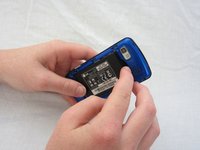
Vire o telefone para que o lado traseiro fique voltado para cima.
 Pergunte ao FixBot
-
-
-
-
Use o polegar para pressionar a pequena saliência na parte inferior do celular e, em seguida, empurre para cima para deslizar e remover a tampa traseira.
-
-
-
-
-
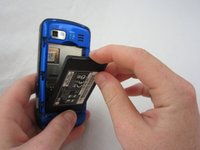
Use o seu dedo indicador para puxar a parte superior da bateria para fora através da reentrância central superior. Em seguida, puxe a bateria na sua direção para removê-la do compartimento.
-
-


Para a remontagem de seu dispositivo, siga estas instruções na ordem inversa.
Cancelar: não concluí este guia.
2 outras pessoas executaram este guia.

Equipe

Cal Poly, Team 9-41, Regan Spring 2012 Membro de Cal Poly, Team 9-41, Regan Spring 2012
CPSU-REGAN-S12S9G41
5 Membros
Autoria de 96 guias
