Ir para o conteúdo principal
Participe da comunidade de reparos - Criar conta

LG Tribute Touchscreen Replacement

O que você precisa

  1. LG Tribute Touchscreen Replacement, Battery: passo 1, imagem 1 %32 LG Tribute Touchscreen Replacement, Battery: passo 1, imagem 2 %32
    • Use the plastic opening tool to pry off the back cover.

    Pergunte ao FixBot

    Comentar

  2. LG Tribute Touchscreen Replacement: passo 2, imagem 1 %32
    • Lift the battery out of place.

    • When replacing the battery, the (+) and (-) symbols must match up with the phone's charging nodes.

    Pergunte ao FixBot

    Comentar

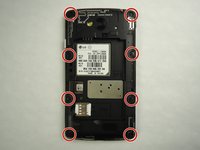
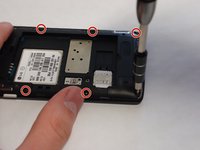
  3. LG Tribute Touchscreen Replacement, Mid-panel: passo 3, imagem 1 %32 LG Tribute Touchscreen Replacement, Mid-panel: passo 3, imagem 2 %32
    • Remove eight 4mm screws using a Phillips head 000 screwdriver (PH000).

    Pergunte ao FixBot

    Comentar

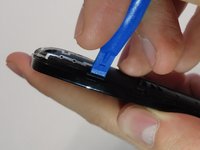
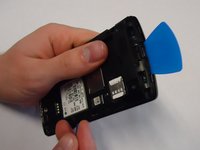
  4. LG Tribute Touchscreen Replacement: passo 4, imagem 1 %32 LG Tribute Touchscreen Replacement: passo 4, imagem 2 %32
    • Use a plastic opening tool to loosen the tabs around the edge of the phone.

    • Inserting a thin piece of plastic will help prevent opened tabs from locking back into place.

    • This step can be frustrating, but requires patience. Avoid the temptation to pry the panel loose. Using excessive force may break the delicate tabs.

    Pergunte ao FixBot

    Comentar

  5. LG Tribute Touchscreen Replacement, Motherboard: passo 5, imagem 1 %32
    • Use a plastic opening tool to disconnect the touchscreen from the motherboard.

    • The motherboard will be completely free from the front panel after this step.

    Pergunte ao FixBot

    Comentar

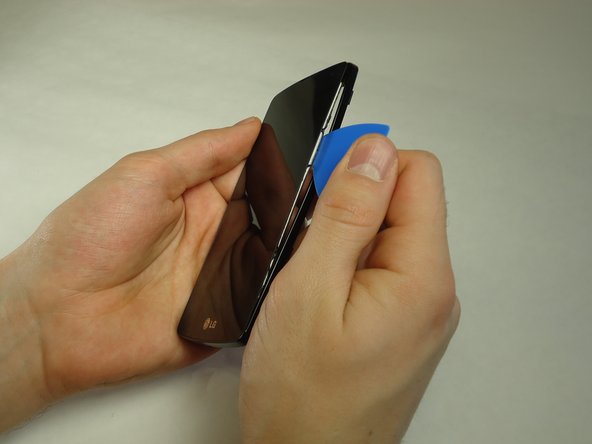
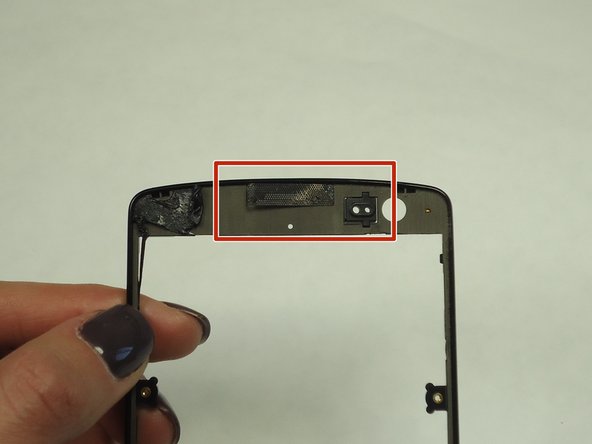
  6. LG Tribute Touchscreen Replacement, Touchscreen: passo 6, imagem 1 %32 LG Tribute Touchscreen Replacement, Touchscreen: passo 6, imagem 2 %32 LG Tribute Touchscreen Replacement, Touchscreen: passo 6, imagem 3 %32
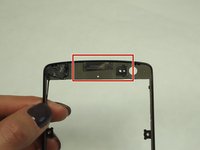
    • Use a thin piece of plastic to carefully peel the frame away from the touchscreen glass.

    • When the frame is completely free, remove all of the glue.

    • When removing the glue, be sure the speaker grill and LED light spacer do not dislodge.

    Pergunte ao FixBot

    Comentar

Conclusão

To reassemble your device, follow these instructions in reverse order.

Cancelar: não concluí este guia.

12 outras pessoas executaram este guia.

4Comentários do guia

thank you for all ypu work at web site

salah dholman - Responder Compartilhar

Can you peel away lens without taking apart ?

mikeknapik1 - Responder Compartilhar

Must I remove the motherboard to replace the front cover with the glass?

Deb Schell - Responder Compartilhar

I messed up the speaker is there a way to replace or fix it

bigestbabybratt - Responder Compartilhar

Comentar

Visualizações:

Últimas 24 horas: 0

Últimos 7 dias: 7

Últimos 30 dias: 33

Ao todo: 16,517