Ir para o conteúdo principal
Participe da comunidade de reparos - Criar conta

LG Tribute Front Facing Camera Replacement

O que você precisa

  1. LG Tribute Front Facing Camera  Replacement, Battery: passo 1, imagem 1 %32 LG Tribute Front Facing Camera  Replacement, Battery: passo 1, imagem 2 %32
    • Use the plastic opening tool to pry off the back cover.

    Pergunte ao FixBot

    Comentar

  2. LG Tribute Front Facing Camera  Replacement: passo 2, imagem 1 %32
    • Lift the battery out of place.

    • When replacing the battery, the (+) and (-) symbols must match up with the phone's charging nodes.

    Pergunte ao FixBot

    Comentar

  3. LG Tribute Front Facing Camera  Replacement, Mid-panel: passo 3, imagem 1 %32 LG Tribute Front Facing Camera  Replacement, Mid-panel: passo 3, imagem 2 %32
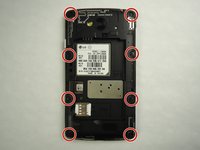
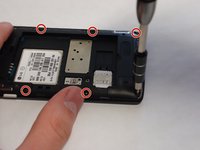
    • Remove eight 4mm screws using a Phillips head 000 screwdriver (PH000).

    Pergunte ao FixBot

    Comentar

  4. LG Tribute Front Facing Camera  Replacement: passo 4, imagem 1 %32 LG Tribute Front Facing Camera  Replacement: passo 4, imagem 2 %32
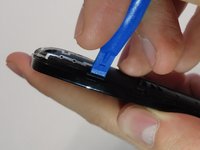
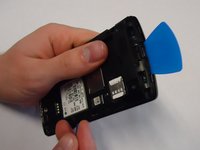
    • Use a plastic opening tool to loosen the tabs around the edge of the phone.

    • Inserting a thin piece of plastic will help prevent opened tabs from locking back into place.

    • This step can be frustrating, but requires patience. Avoid the temptation to pry the panel loose. Using excessive force may break the delicate tabs.

    Pergunte ao FixBot

    Comentar

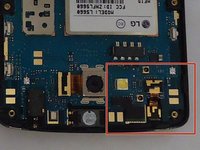
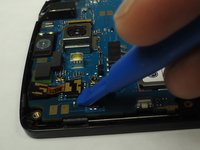
  5. LG Tribute Front Facing Camera  Replacement, Front Facing Camera: passo 5, imagem 1 %32 LG Tribute Front Facing Camera  Replacement, Front Facing Camera: passo 5, imagem 2 %32
    • Use the plastic opening tool to carefully pry the front-facing camera from the motherboard.

    Pergunte ao FixBot

    Comentar

Conclusão

To reassemble your device, follow these instructions in reverse order.

Cancelar: não concluí este guia.

4 outras pessoas executaram este guia.

0Comentários do guia

Comentar

Visualizações:

Últimas 24 horas: 2

Últimos 7 dias: 6

Últimos 30 dias: 25

Ao todo: 1,293