Introdução
Remove the battery before removing the back controls to avoid electric shock. Do not lose any screws or the middle button of the back controls.
O que você precisa
-
-
Flip the LG K7 over so that the back of the phone is facing up.
-
Locate the small notch on the bottom left side of the phone.
 Pergunte ao FixBot
-
-
-
Insert a plastic opening tool into the notch and lift the back cover upward while holding the bottom portion of the phone down to remove it.
-
-
-
-
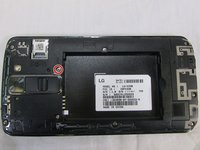
Locate the screw keeping the back controls in place.
-
Use a Phillips 00 screwdriver to remove the 3.4 mm screw.
-
-
-
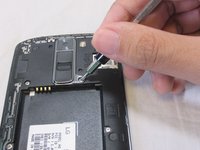
Using the plastic opening tool create a space between the chrome bezel of the back buttons and the phone's casing.
-
Using the plastic opening tool pry the back buttons upward to remove them from the phone's casing.
-



To reassemble your device, follow these instructions in reverse order.

Equipe

USF Tampa, Team S2-G5, Nance Fall 2017 Membro de USF Tampa, Team S2-G5, Nance Fall 2017
USFT-NANCE-F17S2G5
3 Membros
Autoria de 12 guias
