Ir para o conteúdo principal
Participe da comunidade de reparos - Criar conta

LG G4 Screen Assembly Replacement

O que você precisa

  1. LG G4 Screen Assembly Replacement, Back Cover: passo 1, imagem 1 %32
    • Make sure the phone is powered off.

    • Remove the rear cover by placing the plastic opening tool in the groove on the bottom left side of the LG G4 and gently prying up.

    Pergunte ao FixBot
  2. LG G4 Screen Assembly Replacement: passo 2, imagem 1 %32 LG G4 Screen Assembly Replacement: passo 2, imagem 2 %32
    • Place the plastic opening tool at the bottom edge of the battery and lift up. Carefully remove battery with your hands.

    Pergunte ao FixBot
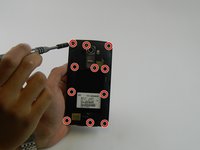
  3. LG G4 Screen Assembly Replacement: passo 3, imagem 1 %32 LG G4 Screen Assembly Replacement: passo 3, imagem 2 %32 LG G4 Screen Assembly Replacement: passo 3, imagem 3 %32
    • Remove the eleven 3.9 mm Phillips #00 screws found at the back of the phone.

    Pergunte ao FixBot
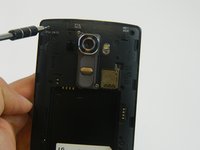
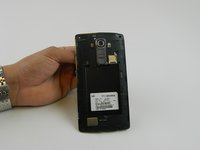
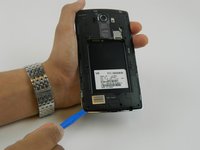
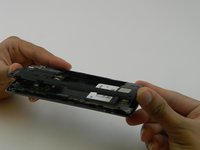
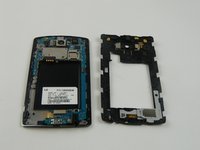
  4. LG G4 Screen Assembly Replacement: passo 4, imagem 1 %32 LG G4 Screen Assembly Replacement: passo 4, imagem 2 %32 LG G4 Screen Assembly Replacement: passo 4, imagem 3 %32
    • Once all the screws have been removed, place the plastic opening tool in the lower left corner and firmly lift the cover up.

    • Detach the cover with your fingers

    Pergunte ao FixBot
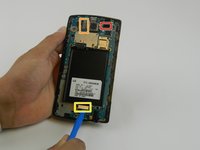
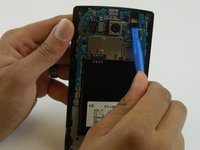
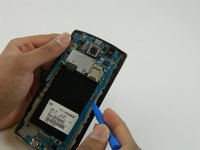
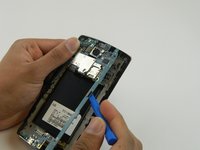
  5. LG G4 Screen Assembly Replacement, Motherboard: passo 5, imagem 1 %32 LG G4 Screen Assembly Replacement, Motherboard: passo 5, imagem 2 %32
    • Remove the following four press-fit connectors with the flat edge of a plastic spudger or opening tool:

    • Front-facing camera connector.

    • Rear-facing camera connector.

    • Digitizer connector.

    • The rear-facing camera may be held down to the frame with two sided tape. Try to move the camera with the spudger prior to lifting the motherboard If it does not budge, use the same tool to pry it from the frame to avoid damaging the connector cable in the next step.

    Pergunte ao FixBot
  6. LG G4 Screen Assembly Replacement: passo 6, imagem 1 %32 LG G4 Screen Assembly Replacement: passo 6, imagem 2 %32
    • Remove the motherboard by lifting it up using the plastic opening tool and your fingers .

    Pergunte ao FixBot
  7. LG G4 Screen Assembly Replacement, Screen Assembly: passo 7, imagem 1 %32
    • Use a heat gun or iOpener over the auxiliary port to soften the adhesive that secures it to the plastic housing.

    Pergunte ao FixBot
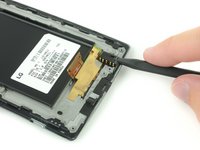
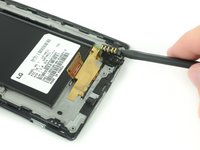
  8. LG G4 Screen Assembly Replacement: passo 8, imagem 1 %32 LG G4 Screen Assembly Replacement: passo 8, imagem 2 %32
    Ferramenta utilizada neste passo:
    Spudger
    $2.99
    • Insert a nylon spudger into the auxiliary port and gently pry upward to free the port.

    Pergunte ao FixBot
  9. LG G4 Screen Assembly Replacement, Other components: passo 9, imagem 1 %32
    • You may also need to remove the vibration motor (the small circular component with two gold contacts), ear-speaker, and two rubber covers on either side of the ear-speaker to transfer these over to the new display assembly.

    • Use a spudger to carefully remove these components and then place them in the new display assembly..

    Pergunte ao FixBot
Conclusão

To reassemble your device, follow these instructions in reverse order.

4 outras pessoas executaram este guia.

Sam Goldheart

Membro desde: 10/18/12

477.308 Reputação

Autoria de 538 guias

Equipe

iFixit Membro de iFixit

Staff

123 Membros

Autoria de 25.799 guias

0Comentários do guia

Comentar

Visualizações:

Últimas 24 horas: 3

Últimos 7 dias: 14

Últimos 30 dias: 79

Ao todo: 2,010