Ir para o conteúdo principal
Participe da comunidade de reparos - Criar conta

LG G Watch R Battery Replacement Replacement

O que você precisa

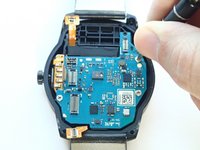
  1. LG G Watch R Battery Replacement Replacement, Back Case: passo 1, imagem 1 %32 LG G Watch R Battery Replacement Replacement, Back Case: passo 1, imagem 2 %32
    • Power off your watch before disassembling it.

    • Place the watch upside down on a hard surface so that its back case is facing upright.

    • Use a T4 Torx Star screwdriver to remove the four 4.0 mm Torx screws from the corners of the back case.

    Pergunte ao FixBot

    Comentar

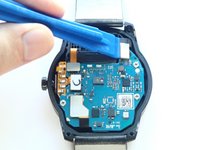
  2. LG G Watch R Battery Replacement Replacement: passo 2, imagem 1 %32
    • Use a plastic opening tool to pry open the back case from both sides of the watch.

    Pergunte ao FixBot

    Comentar

  3. LG G Watch R Battery Replacement Replacement: passo 3, imagem 1 %32
    • Remove the back case.

    Pergunte ao FixBot

    Comentar

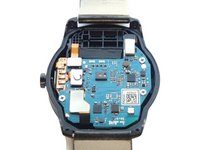
  4. LG G Watch R Battery Replacement Replacement, Motherboard: passo 4, imagem 1 %32 LG G Watch R Battery Replacement Replacement, Motherboard: passo 4, imagem 2 %32
    • With a plastic opening tool, disconnect the four connectors on the top of the motherboard.

    Pergunte ao FixBot

    Comentar

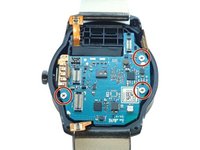
  5. LG G Watch R Battery Replacement Replacement: passo 5, imagem 1 %32 LG G Watch R Battery Replacement Replacement: passo 5, imagem 2 %32
    • Remove three 3.0 mm Phillips screws on the edges of the motherboard with a Phillips #000 screwdriver.

    Pergunte ao FixBot

    Comentar

  6. LG G Watch R Battery Replacement Replacement: passo 6, imagem 1 %32
    • Grasp the edges of the motherboard and slide it slightly towards the right to remove it from its case.

    Pergunte ao FixBot

    Comentar

  7. LG G Watch R Battery Replacement Replacement, Battery Replacement: passo 7, imagem 1 %32
    • Use a plastic opening tool to pry the battery out of the device.

    • You may need to use a stronger prying force due to the adhesive that secures the battery to the case.

    Pergunte ao FixBot

    Comentar

Conclusão

To reassemble your device, follow these instructions in reverse order.

Cancelar: não concluí este guia.

71 outras pessoas executaram este guia.

Westley Courchene

Membro desde: 01/13/15

3.410 Reputação

Autoria de 14 guias

Equipe

USF Tampa, Team 1-1, Remmell Fall 2015 Membro de USF Tampa, Team 1-1, Remmell Fall 2015

USFT-REMMELL-F15S1G1

5 Membros

Autoria de 14 guias

13Comentários do guia

The question is where i can find such battery ?

obada abu alhiga - Responder Compartilhar

It did help, small correction - Use a T4 instead of T5 screw driver

Suyog Patki - Responder Compartilhar

On my G Watch R the T5 screw driver perfektly fits.

igor-sweet - Responder Compartilhar

I second the fonejoy link, got it delivered from them very quickly. And I also second what Suyog said regarding the Torx screwdriver, on my own watch I needed a T4, the T5 didn't work, but I had a set so I was okay.

Mike - Responder Compartilhar

Comentar

Visualizações:

Últimas 24 horas: 0

Últimos 7 dias: 11

Últimos 30 dias: 66

Ao todo: 31,639