Introdução
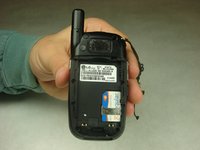
This guide will help in replacing the battery of the LG CU400. In this guide it will be explained how to remove the back cover and the battery from the phone, as well as replacing the battery.
-
-
-
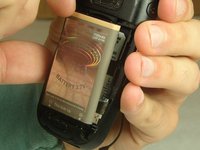
To remove the battery, grasp the top front edge of the battery and pull the battery away from the phone.
-


 Pergunte ao FixBot


To reassemble your device, follow these instructions in reverse order.
Cancelar: não concluí este guia.
2 outras pessoas executaram este guia.

Equipe

IUPUI, Team 1-3, Harley Fall 2016 Membro de IUPUI, Team 1-3, Harley Fall 2016
IUPUI-HARLEY-F16S1G3
4 Membros
Autoria de 14 guias
