Ir para o conteúdo principal
Participe da comunidade de reparos - Criar conta

LG 1010 LCD Screen Replacement

O que você precisa

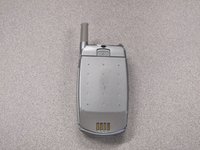
  1. LG 1010 LCD Screen Replacement, Battery: passo 1, imagem 1 %32
    • Turn off the cell phone and place face down on a flat surface.

    Pergunte ao FixBot

    Comentar

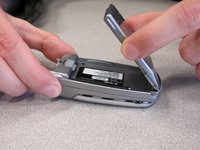
  2. LG 1010 LCD Screen Replacement: passo 2, imagem 1 %32 LG 1010 LCD Screen Replacement: passo 2, imagem 2 %32
    • While sliding the gray tab up, lift battery up and away from the cell phone.

    Pergunte ao FixBot

    Comentar

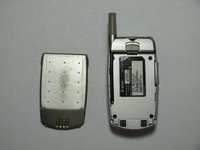
  3. LG 1010 LCD Screen Replacement: passo 3, imagem 1 %32 LG 1010 LCD Screen Replacement: passo 3, imagem 2 %32 LG 1010 LCD Screen Replacement: passo 3, imagem 3 %32
    • Remove battery and set aside.

    Pergunte ao FixBot

    Comentar

  4. LG 1010 LCD Screen Replacement, Front  Cover: passo 4, imagem 1 %32 LG 1010 LCD Screen Replacement, Front  Cover: passo 4, imagem 2 %32
    • Use a Spudger to remove the two front plastic covers to reveal screws.

    Pergunte ao FixBot

    Comentar

  5. LG 1010 LCD Screen Replacement: passo 5, imagem 1 %32
    • Remove two screws using a Torx T6 screwdriver.

    Pergunte ao FixBot

    Comentar

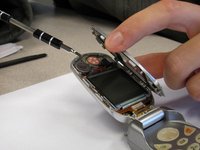
  6. LG 1010 LCD Screen Replacement: passo 6, imagem 1 %32 LG 1010 LCD Screen Replacement: passo 6, imagem 2 %32
    • Pry off the screen front cover with a small flathead screwdriver.

    Pergunte ao FixBot

    Comentar

  7. LG 1010 LCD Screen Replacement: passo 7, imagem 1 %32
    • Insert a small flathead screwdriver into the hinge and separate hinge connection.

    Pergunte ao FixBot

    Comentar

  8. LG 1010 LCD Screen Replacement: passo 8, imagem 1 %32
    • Pry off the speaker which is glued on to the front cover using a small flathead screwdriver.

    Pergunte ao FixBot

    Comentar

  9. LG 1010 LCD Screen Replacement: passo 9, imagem 1 %32
    • Remove remaining portion of the front case from the flexible circuit board.

    • Do not attempt to remove the LCD board at this time, as it is attached to the rear panel assembly.

    Pergunte ao FixBot

    Comentar

  10. LG 1010 LCD Screen Replacement, Back Cover: passo 10, imagem 1 %32 LG 1010 LCD Screen Replacement, Back Cover: passo 10, imagem 2 %32
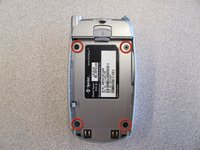
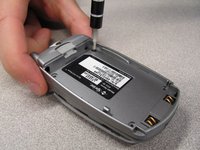
    • Unscrew the four screws on the back case using a T6 Torx Screwdriver.

    Pergunte ao FixBot

    Comentar

  11. LG 1010 LCD Screen Replacement: passo 11, imagem 1 %32 LG 1010 LCD Screen Replacement: passo 11, imagem 2 %32
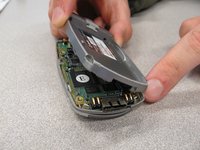
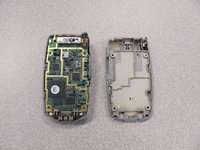
    • Pull the back cover straight off the phone using your thumb and forefinger.

    Pergunte ao FixBot

    Comentar

  12. LG 1010 LCD Screen Replacement, Keypad: passo 12, imagem 1 %32
    • Pry off circuit board with a flathead screwdriver.

    Pergunte ao FixBot

    Comentar

  13. LG 1010 LCD Screen Replacement: passo 13, imagem 1 %32
    • Pull out flexible keypad.

    Pergunte ao FixBot

    Comentar

  14. LG 1010 LCD Screen Replacement, LCD Screen: passo 14, imagem 1 %32
    • The phone should now look like the picture to the left.

    Pergunte ao FixBot

    Comentar

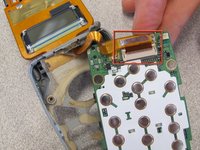
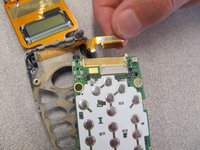
  15. LG 1010 LCD Screen Replacement: passo 15, imagem 1 %32 LG 1010 LCD Screen Replacement: passo 15, imagem 2 %32
    • Locate and detach the ribbon cable from circuit board.

    Pergunte ao FixBot

    Comentar

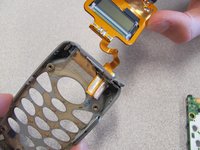
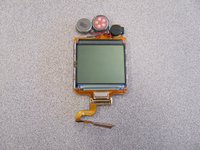
  16. LG 1010 LCD Screen Replacement: passo 16, imagem 1 %32 LG 1010 LCD Screen Replacement: passo 16, imagem 2 %32
    • Remove the LCD Screen from the phone case and replace with a new LCD screen.

    Pergunte ao FixBot

    Comentar

Conclusão

To reassemble your device, follow these instructions in reverse order.

Cancelar: não concluí este guia.

2 outras pessoas executaram este guia.

Equipe

Cal Poly, Team 3-25, Regan Fall 2010 Membro de Cal Poly, Team 3-25, Regan Fall 2010

CPSU-REGAN-F10S3G25

4 Membros

Autoria de 14 guias

0Comentários do guia

Comentar

Visualizações:

Últimas 24 horas: 2

Últimos 7 dias: 5

Últimos 30 dias: 69

Ao todo: 1,312