Essa tradução foi gerada por um programa e ainda não foi revisada por uma pessoa. Falas essa língua? Dá uma olhada.

Substituição do painel traseiro do Kurio 7

Eric Rice e 10 outros colaboradores
Última atualização em 17 de ago de 2026
Visualizações: 3,1 mil
Visualizar Estatísticas:
- Últimas 24 horas:
- 3
- Últimos 7 dias:
- 24
- Últimos 30 dias:
- 89
- Ao todo:
- 3.099
Comentários: 0
Ninguém deixou comentários sobre este guia. Você será o primeiro?
Go to guide commentsConcluído: 2 3
2 pessoas marcaram este guia como "concluído". Será você o próximo?
3· pessoas marcaram este guia como "concluído". Incluindo você — ótimo trabalho!
Favorites: 2 3
2 pessoas favoritaram (e se inscreveram) neste guia. Você será o próximo?
3 pessoas marcaram como favorito (e assinaram) este guia - incluindo você!
Introdução
Ir para o passo 1 ↓Se o painel traseiro do seu Kurio 7 estiver quebrado, este é um processo simples para substituí-lo. Este guia também serve para abrir o dispositivo para outros reparos e substituições.
O que você precisa
Peças
Ferramentas


-
-
-
Comece removendo a capa de borracha do Kurio 7.
 Pergunte ao FixBot
-
-
-
Remova os quatro parafusos Phillips #00 de 30 mm da carcaça externa.
-
-
-
Insira a Ferramenta de abertura de plástico na fenda entre a capa frontal e a capa traseira do dispositivo.
-
Deslize a Ferramenta de abertura de plástico ao redor da borda do dispositivo. Com cuidado, force a separação das abas que prendem a capa frontal à capa traseira.
-
-
-
-
Assim que todas as abas forem removidas, a capa traseira deverá sair facilmente.
-
-


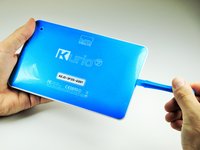
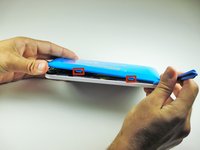


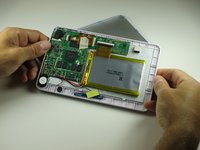
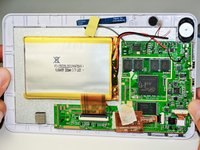
Substitua por um novo painel traseiro. Para a remontagem de seu dispositivo, siga estas instruções na ordem inversa.
Cancelar: não concluí este guia.
2 outras pessoas executaram este guia.

Equipe

Cal Poly, Team 12-36, Maness Spring 2014 Membro de Cal Poly, Team 12-36, Maness Spring 2014
CPSU-MANESS-S14S12G36
4 Membros
Autoria de 84 guias
