Ir para o conteúdo principal
Participe da comunidade de reparos - Criar conta

Integrated Headset Replacement

O que você precisa

  1. Integrated Headset Replacement, Integrated Headset: passo 1, imagem 1 %32 Integrated Headset Replacement, Integrated Headset: passo 1, imagem 2 %32 Integrated Headset Replacement, Integrated Headset: passo 1, imagem 3 %32
    • Use a 6 mm Allen wrench to loosen the pinch bolts on each side of the stem.

    • Make sure to alternate between each side.

    Pergunte ao FixBot

    Comentar

  2. Integrated Headset Replacement: passo 2, imagem 1 %32 Integrated Headset Replacement: passo 2, imagem 2 %32 Integrated Headset Replacement: passo 2, imagem 3 %32
    • After loosening the bolts, the stem will be free to rotate.

    • Loosen and remove the top cap compression bolt.

    Pergunte ao FixBot

    Comentar

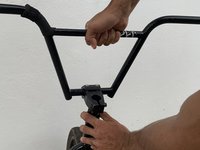
  3. Integrated Headset Replacement: passo 3, imagem 1 %32 Integrated Headset Replacement: passo 3, imagem 2 %32 Integrated Headset Replacement: passo 3, imagem 3 %32
    • Lift the bars and stem to remove them from the fork.

    • Turn the bars side to side while you pull up. This should help you remove a tight stem.

    Pergunte ao FixBot

    Comentar

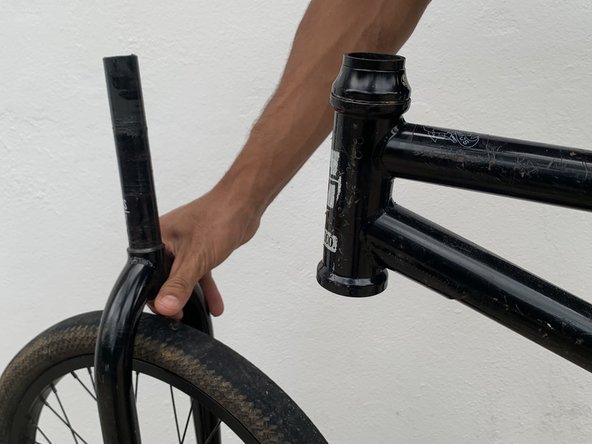
  4. Integrated Headset Replacement: passo 4, imagem 1 %32 Integrated Headset Replacement: passo 4, imagem 2 %32 Integrated Headset Replacement: passo 4, imagem 3 %32
    • Remove the fork and headset from the bottom of the frame.

    Pergunte ao FixBot

    Comentar

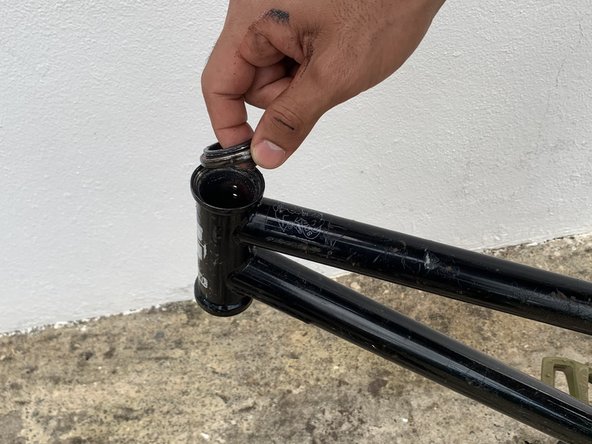
  5. Integrated Headset Replacement: passo 5, imagem 1 %32 Integrated Headset Replacement: passo 5, imagem 2 %32 Integrated Headset Replacement: passo 5, imagem 3 %32
    • Remove the dust cap on top and replace the old bearings with the new headset if necessary.

    • Apply a thin coat of grease as needed on the frame’s head tube or steering head and fork.

    Pergunte ao FixBot

    Comentar

  6. Integrated Headset Replacement: passo 6, imagem 1 %32 Integrated Headset Replacement: passo 6, imagem 2 %32 Integrated Headset Replacement: passo 6, imagem 3 %32
    • Slide the fork back on the frame and place the compression ring on the upper headset bearing.

    Pergunte ao FixBot

    Comentar

  7. Integrated Headset Replacement: passo 7, imagem 1 %32 Integrated Headset Replacement: passo 7, imagem 2 %32 Integrated Headset Replacement: passo 7, imagem 3 %32
    • Slide the dust cover on and install the stem.

    • Check the amount of space between the top of the steerer tube and the top of your stem. Your steerer tube should lay just a few millimeters below, and allow for clamping and compression. If it doesn't, add a spacer on top of the dust cover and under the stem.

    Pergunte ao FixBot

    Comentar

  8. Integrated Headset Replacement: passo 8, imagem 1 %32 Integrated Headset Replacement: passo 8, imagem 2 %32 Integrated Headset Replacement: passo 8, imagem 3 %32
    • Reinstall the compression bolt and tighten it down, while at the same time keeping the bars in alignment.

    • Tighten the compression bolt until the thread becomes hard.

    • Use the socket wrench to turn the bolt half turn more and check for play by rocking the bars forward and backwards while pinching the frame with your knees.

    Pergunte ao FixBot

    Comentar

  9. Integrated Headset Replacement: passo 9, imagem 1 %32 Integrated Headset Replacement: passo 9, imagem 2 %32 Integrated Headset Replacement: passo 9, imagem 3 %32
    • Check for play and make sure the bars turn smoothly.

    • You don’t want to over tighten the compression bolt as this will result in improper steering.

    • Secure the pinching bolts on each side of the stem, alternating between each side as you go.

    Pergunte ao FixBot

    Comentar

Conclusão

The final product should end up with aligned and firm bars. There should be no forward or backwards play and everything should turn smoothly.

Cancelar: não concluí este guia.

0Comentários do guia

Comentar

Visualizações:

Últimas 24 horas: 4

Últimos 7 dias: 23

Últimos 30 dias: 91

Ao todo: 1,243