Essa tradução foi gerada por um programa e ainda não foi revisada por uma pessoa. Falas essa língua? Dá uma olhada.
Introdução
Desligue sempre o computador antes de tentar qualquer instalação ou remoção de componentes de hardware. Certifique-se de remover o adaptador de corrente alternada e todos os cabos do computador. Se o computador esteve ligado, aguarde alguns minutos antes de iniciar o procedimento para garantir que todas as peças tenham arrefecido.
O que você precisa
-
-
-
Vire o computador para ver a pequena trava da bateria localizada perto da parte superior do Thinkpad.
-
Use o dedo para deslizar a trava para a direita e desbloquear a bateria.
 Pergunte ao FixBot
-
-
-
Quando a trava estiver na posição destravada (totalmente à direita), puxe a bateria para fora, afastando-a do Thinkpad.
-
A bateria está agora desconectada.
-
-
-
-
-
-
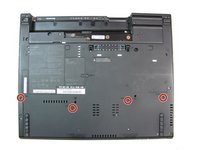
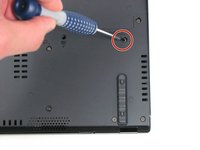
Usando uma chave Phillips #0, remova os quatro parafusos de 17,0 mm.
-
-
-
Vire o computador novamente, com o teclado voltado para cima.
-
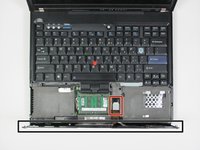
Abra a tela para acessar o apoio para as mãos. Aplique pressão nas laterais do apoio para as mãos, de modo que ele se dobre para cima no meio. Levante-o cuidadosamente do computador.
-
-
-
Levante ligeiramente o apoio para as mãos, afastando-o do computador.
-
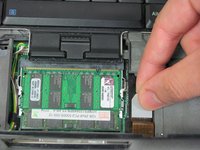
Desconecte o conector puxando a aba branca para cima.
-
-




Para a remontagem de seu dispositivo, siga estas instruções na ordem inversa.
Cancelar: não concluí este guia.
5 outras pessoas executaram este guia.

Equipe

Cal Poly, Team 7-9, Maness Winter 2013 Membro de Cal Poly, Team 7-9, Maness Winter 2013
CPSU-MANESS-W13S7G9
4 Membros
Autoria de 96 guias
1Comentário do guia
Needs a tutorial on how to install it. I can’t get the palmrest on correctly, I can still lift up on the palmrest and the laptop doesn’t latch properly.
