Ir para o conteúdo principal
Participe da comunidade de reparos - Criar conta

IBM ThinkPad A30 RAM Replacement

O que você precisa

  1. IBM ThinkPad A30 RAM Replacement, Battery: passo 1, imagem 1 %32 IBM ThinkPad A30 RAM Replacement, Battery: passo 1, imagem 2 %32
    • Flip the ThinkPad over so that it is upside down.

    • Slide the highlighted tab to the left.

    • With your finger on the tab, remove the battery by lifting it upwards away from the laptop.

    Pergunte ao FixBot

    Comentar

  2. IBM ThinkPad A30 RAM Replacement, RAM: passo 2, imagem 1 %32 IBM ThinkPad A30 RAM Replacement, RAM: passo 2, imagem 2 %32
    • Remove the two 5.3mm cover screws.

    • Gently lift the cover containing the RAM.

    Pergunte ao FixBot

    Comentar

  3. IBM ThinkPad A30 RAM Replacement: passo 3, imagem 1 %32
    • Remove RAM module by pressing the two metal pieces outward with your thumbs.

    Pergunte ao FixBot

    Comentar

  4. IBM ThinkPad A30 RAM Replacement: passo 4, imagem 1 %32 IBM ThinkPad A30 RAM Replacement: passo 4, imagem 2 %32
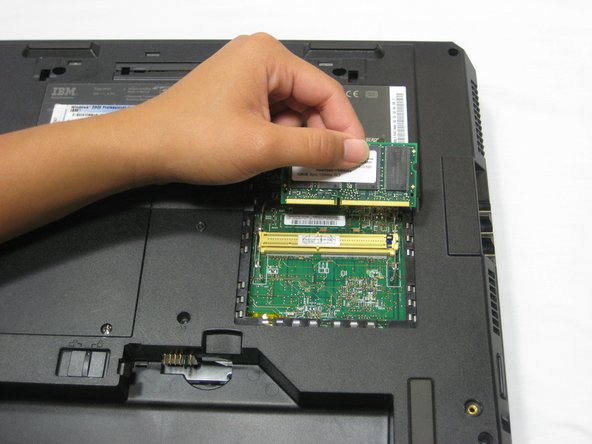
    • Lift the RAM module up and out, away from the yellow connector.

    • Place the RAM module away from any magnets or static electricity prone areas.

    Pergunte ao FixBot

    Comentar

Conclusão

To reassemble your device, follow these instructions in reverse order.

Cancelar: não concluí este guia.

Uma outra pessoa concluiu este guia.

Jessica

Membro desde: 10/06/10

162 Reputação

Autoria de 7 guias

Equipe

Cal Poly, Team 4-44, Amido Fall 2010 Membro de Cal Poly, Team 4-44, Amido Fall 2010

CPSU-AMIDO-F10S4G44

4 Membros

Autoria de 26 guias

0Comentários do guia

Comentar

Visualizações:

Últimas 24 horas: 1

Últimos 7 dias: 3

Últimos 30 dias: 52

Ao todo: 3,523