Ir para o conteúdo principal
Participe da comunidade de reparos - Criar conta

Huawei Watch Jewel Motherboard Replacement

O que você precisa

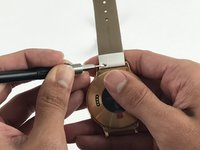
    1. Huawei Watch Jewel Motherboard Replacement, Strap: passo 1, imagem 1 %32 Huawei Watch Jewel Motherboard Replacement, Strap: passo 1, imagem 2 %32
      • Begin by laying the watch on a flat, smooth surface.

      • This will prevent the watch screen from suffering damage.

      • Obtain a Flex Extension with a Size 1.0 mm flat-head. In the case of not having said tool, for this model of watch one can use the hands to replace the strap.

      Pergunte ao FixBot

      Comentar

    2. Huawei Watch Jewel Motherboard Replacement: passo 2, imagem 1 %32 Huawei Watch Jewel Motherboard Replacement: passo 2, imagem 2 %32
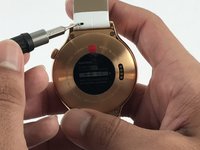
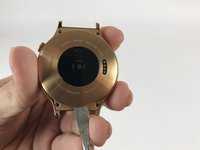
      • Locate the two springs on the back of your watch.

      • The watch comes with two of these springs on each side of the back-face. These are used to release the straps from the body of the watch.

      Pergunte ao FixBot

      Comentar

    3. Huawei Watch Jewel Motherboard Replacement: passo 3, imagem 1 %32 Huawei Watch Jewel Motherboard Replacement: passo 3, imagem 2 %32 Huawei Watch Jewel Motherboard Replacement: passo 3, imagem 3 %32
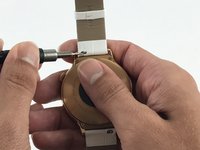
      • Use the Flex Extension to push the spring to the right. This will release the strap from the watch head.

      Pergunte ao FixBot

      Comentar

    4. Huawei Watch Jewel Motherboard Replacement: passo 4, imagem 1 %32
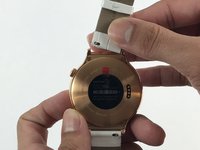
      • Carefully pull the strap away from the watch.

      Pergunte ao FixBot

      Comentar

    5. Huawei Watch Jewel Motherboard Replacement: passo 5, imagem 1 %32 Huawei Watch Jewel Motherboard Replacement: passo 5, imagem 2 %32
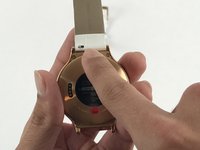
      • Repeat step 3, this time using the other strap.

      Pergunte ao FixBot

      Comentar

    1. Huawei Watch Jewel Motherboard Replacement, Motherboard: passo 6, imagem 1 %32
      • Locate the 4 T3 screws in the back of your watch, and use the T3 Torx Screwdriver to unscrew them.

      Pergunte ao FixBot

      Comentar

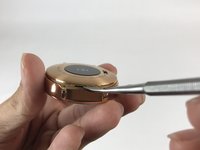
    2. Huawei Watch Jewel Motherboard Replacement: passo 7, imagem 1 %32 Huawei Watch Jewel Motherboard Replacement: passo 7, imagem 2 %32
      • Use the Metal Spudger to pry open the back of your watch.

      • Make sure the watch is off and not plugged in when prying into the case with the Metal Spudger to avoid the risk of electric shock.

      Pergunte ao FixBot

      Comentar

    3. Huawei Watch Jewel Motherboard Replacement: passo 8, imagem 1 %32
      • Remove the back case.

      Pergunte ao FixBot

      Comentar

    4. Huawei Watch Jewel Motherboard Replacement: passo 9, imagem 1 %32 Huawei Watch Jewel Motherboard Replacement: passo 9, imagem 2 %32
      Ferramenta utilizada neste passo:
      Tweezers
      $4.99
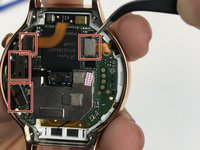
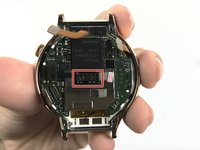
      • Use tweezers or a nylon spudger to pry up the four press-fit connectors.

      • The glued-down connector in the middle is harder to remove than the rest. That is perfectly fine.

      Pergunte ao FixBot

      Comentar

    5. Huawei Watch Jewel Motherboard Replacement: passo 10, imagem 1 %32
      • Locate the two Phillips #00 screws holding down the motherboard, and use the Phillips #00 screwdriver to remove them.

      • Ensure to place these screws separately from the Torx screws, as they can easily be mixed up.

      Pergunte ao FixBot

      Comentar

    6. Huawei Watch Jewel Motherboard Replacement: passo 11, imagem 1 %32
      Ferramenta utilizada neste passo:
      Spudger
      $2.99
      • Use the Metal Spudger to lift the mother board from the watch.

      • The metal spudger may cause damage to the device, use a black nylon spudger when possible.

      Pergunte ao FixBot

      Comentar

    7. Huawei Watch Jewel Motherboard Replacement: passo 12, imagem 1 %32
      • Remove the motherboard.

      Pergunte ao FixBot

      Comentar

Conclusão

To reassemble your device, follow these instructions in reverse order.

Cancelar: não concluí este guia.

3 outras pessoas executaram este guia.

ngan tran

Membro desde: 02/15/17

526 Reputação

Autoria de 2 guias

Equipe

USF Tampa, Team 5-3, Passmore Spring 2017 Membro de USF Tampa, Team 5-3, Passmore Spring 2017

USFT-PASSMORE-S17S5G3

4 Membros

Autoria de 3 guias

1Comentário do guia

where i can i buy Huawei Watch Jewel Motherboard online?

Mao Sereivathanak - Responder Compartilhar

Comentar

Visualizações:

Últimas 24 horas: 1

Últimos 7 dias: 10

Últimos 30 dias: 28

Ao todo: 3,674