Introdução
This guide will provide step-by-step instructions on replacing the LCD Display in a Huawei Honor 8.
O que você precisa
-
-
Using a heat gun or hairdryer, apply heat approximately three inches above the glass panel to warm up the adhesive around the outside edge of the phone.
 Pergunte ao FixBot
-
-
-
Using a plastic opening tool, gently pry up a corner of the rear glass panel.
-
Slowly slide the plastic opening tool around the outside of the glass panel to break through the adhesive.
-
Gently lift the back panel off once all the adhesive has been removed.
-
-
-
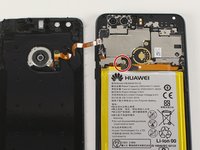
Using a Phillips PH00 screwdriver, remove the silver Phillips 3.5 mm screw circled in red.
-
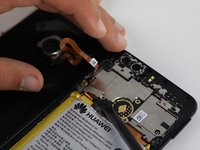
Using a spudger, gently lift off the small metal tab that was held in place by the screw.
-
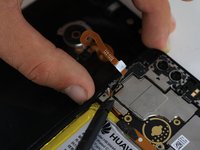
Gently pry off the orange ribbon wire on the back panel.
-
-
-
Using a Phillips PH00 screwdriver, remove the eight silver Phillips 3.5 mm screws circled in red.
-
Using a Phillips PH00 screwdriver, remove the six black Phillips 4.0 mm screws circled in orange.
-
Using a Phillips PH00 screwdriver, remove the single silver 3.0 mm Phillips screw circled in yellow.
-
Using the Phillips PH00 screwdriver tip, gently scratch away the white stickers outlined in green circles to expose hidden screws.
-
Using a Phillips PH00 screwdriver, remove the two black Phillips 4.0 mm screws circled in green.
-
-
-
Slowly slide the plastic opening tool around the perimeter of the inner lining.
-
Gently pull the inner lining up to remove it from the phone body.
-
-
-
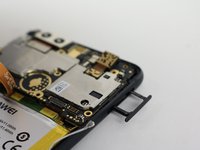
Holding the phone so that the cameras are at the top, locate the small hole on the top right edge of the device.
-
Using the 0.8 mm Sim Eject tool, push down on the small hole to release the Sim Card tray.
-
Gently pull out the Sim Card tray and set it aside.
-
-
-
In the following steps you will disconnect the five connectors circled in red holding the motherboard in place.
-
-
-
-
Gently pull the small ribbon connection between the battery and motherboard upward to disconnect it.
-
-
-
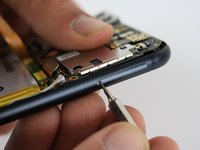
Use a spudger to gently pry off the small antenna cable on the right side of the motherboard.
-
-
-
Using a spudger, gently pry up the small connection that holds the motherboard in place.
-
-
-
Using a spudger, gently pry up the connector near the left edge of the motherboard.
-
-
-
Use a spudger to gently pry off the small connection on the far left edge of the motherboard.
-
-
-
Use a spudger to pry up a corner of the motherboard.
-
Lift the motherboard to remove it from the body of the phone.
-
-
-
Using a spudger, pry off the small connection between the speaker and phone body located near the bottom of the device circled in red.
-
Gently pry up a corner of the speaker using a spudger.
-
Lift the speaker up and out of the phone body.
-
-
-
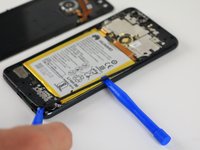
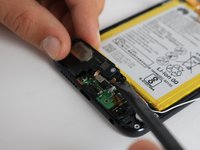
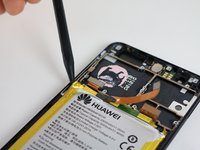
Insert the plastic spudger into the gap between the frame and the battery.
-
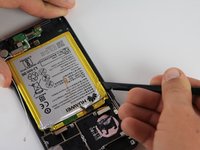
Move the spudger around the outside edge of the battery to remove the adhesive.
-
-
-
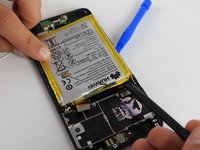
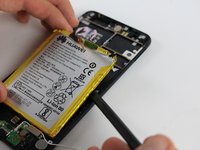
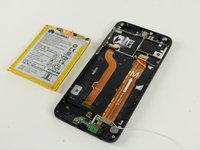
Once all the adhesive has been removed from the battery, use the spudger and plastic opening tools to gently pry the battery away from the frame.
-
-
-
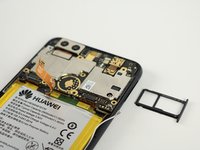
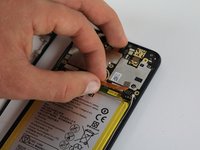
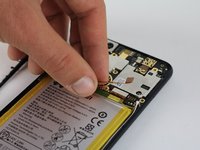
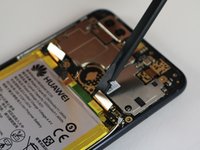
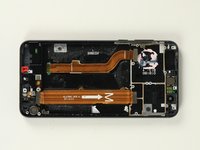
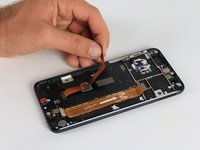
Gently pull the ribbon cable that connects the LCD screen away from the phone body.
-
-
-
Using a heat gun or hairdryer, apply heat approximately three inches above the LCD Display to warm up the adhesive around the outside edge of the phone.
-
-
-
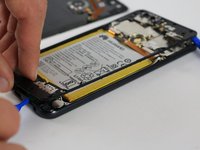
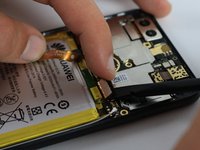
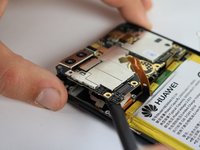
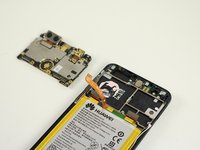
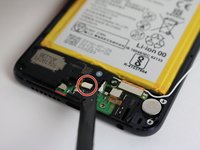
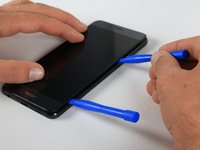
Using a plastic opening tool, gently pry up a corner of the LCD Display.
-
Slowly slide the plastic opening tool around the outside of the LCD Display to break through the adhesive.
-
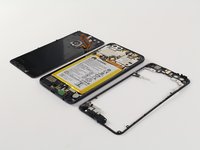
Once all the adhesive has been removed, gently lift the LCD Display off.
-






















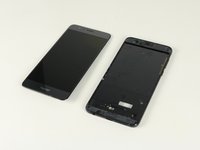
To reassemble your device, follow these instructions in reverse order.
Cancelar: não concluí este guia.
9 outras pessoas executaram este guia.

Equipe

Cal Poly, Team S18-G2, Forte Fall 2017 Membro de Cal Poly, Team S18-G2, Forte Fall 2017
CPSU-FORTE-F17S18G2
4 Membros
Autoria de 26 guias
5Comentários do guia
When removing the LCD I wrongly thought the line on the metal frame was where I should pry and damaged it. You should include a closeup in the guide to show the two and let people know which one to start sticking stuff into. It required a lot of force to get the screen off, the metal frame actually bent outwards from the pressure..
When opening the back cover, make sure not to pry the glass itself off, there’s a really thin piece of plastic (?) behind it. I almost destroyed the cover because of it.
When removing the antenna, don’t force, try removing the antenna by the cable. I broke the connector because it was hard, I somehow managed to repair it (by solder) but DON’T DO THAT the connector is 1mm long, it’s nearly impossible to repair
I have just finished replacing the battery and the screen one this smartphone and it took me forever !!! Unfortunately I forgot to put back the metal tab that holds the screen and fingerprint cable and I am wondering if that is going to be an issue for me in the future as I really don’t want to open the device again !!!
I accidentaly broke the charging cable under the battery while trying to remove the damm thing. The replacment cable is a bit longer. For me the metal tabs are necessary to hold the connectors in place. I supposse in your case everything should be fine.
