Introdução
This guide will help you replace the two motherboards inside your Hover-1 Eclipse. The motherboard serves as a unit that houses and connects all the different computer components. To replace the motherboard you must be cautious when navigating the internal wires that connect to it and be comfortable with disconnecting various wires.
O que você precisa
-
-
-
Using a Phillips #1 Screwdriver, remove the eight 11mm screws that surround the edge of each shell piece.
-
Using a Phillips #1 Screwdriver, remove the eight 13mm screws that surround the edge of both shell pieces.
-
Remove the right side bottom shell piece.
 Pergunte ao FixBot
-
-
-
On the bottom, left side, shell pieces, there are some white and pink wires connecting the shell and the motherboard.
-
On the circuit board by the speaker, carefully squeeze and unplug the small white headers that connect the shell piece to the hoverboard body.
-
Follow the wires that connect the lights to the motherboard. Disconnect these wires from the motherboard by squeezing and pulling the small white headers.
-
Now you can fully remove the bottom left shell piece.
-
-
-
-
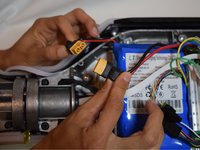
Unplug the yellow tipped plug, Xt60, attached to the red and black cord on the non-battery side.
-
-
-
Unplug the yellow tipped plug attached to the red and black cords.
-
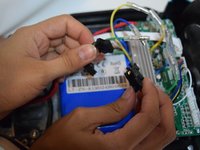
Unplug the black headers attached to the white, skinny cord.
-
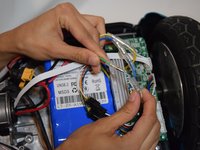
Unplug the green, blue and yellow plugs by pressing down the silver, under the clear plastic and pulling it apart.
-
-
-
Unplug the white header attached to the pink and white cord.
-
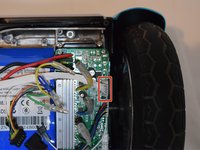
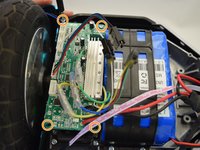
Using a Phillips #1 screwdriver, remove the four screws from each corner of the motherboard.
-
Repeat steps 3 and 4 on the other side.
-
-





To reassemble your device, follow these instructions in reverse order.

Equipe

Cal Poly, Team S12-G4, Regan Fall 2019 Membro de Cal Poly, Team S12-G4, Regan Fall 2019
CPSU-REGAN-F19S12G4
4 Membros
Autoria de 5 guias
7Comentários do guia
Can you please drop links to purchase the 2 motherboards?
Hi
wondering if you know the part numbers and where to obtain the boards?
We’re do you get the boards at I really need them
We’re do get the boards?
Any idea where to buy parts and the price?
